When iMessage fails, your messages go out in the clear
When iMessage drops out, your iPhone falls back to SMS or unencrypted RCS without a real warning. Three Messages settings stop the fallback.
In May, iOS 26.5 started encrypting RCS between iPhone and Android. Your conversation still has to stay on an encrypted channel. The Messages app doesn’t really tell you.
What happens
Glenn Fleishman described it on Six Colors on October 6. His iMessage conversation with his wife switched to RCS with no alert and no apparent reason, then went back to iMessage.
Another case, more predictable. Add someone without iMessage or encrypted RCS to a group, and the whole group goes out in the clear, over RCS or MMS, other members’ messages included.
The only signals are a discreet line in the thread and the encryption status in small print at the very bottom of the conversation’s Info sheet. Apple proudly displays “Encrypted” when all is well, and whispers when it isn’t.
Michael Tsai, a Mac developer, saw his mother’s iPhone get signed out of iMessage, at home, on Wi-Fi, with nothing to warn her. She read the encryption notice as a sign she needed to update her phone.
The three settings
Everything is set on the iPhone, in Settings > Apps > Messages. Neither the iPad nor the Mac gives access to these options. And you won’t necessarily see them all, some only appear if your carrier provides the service.
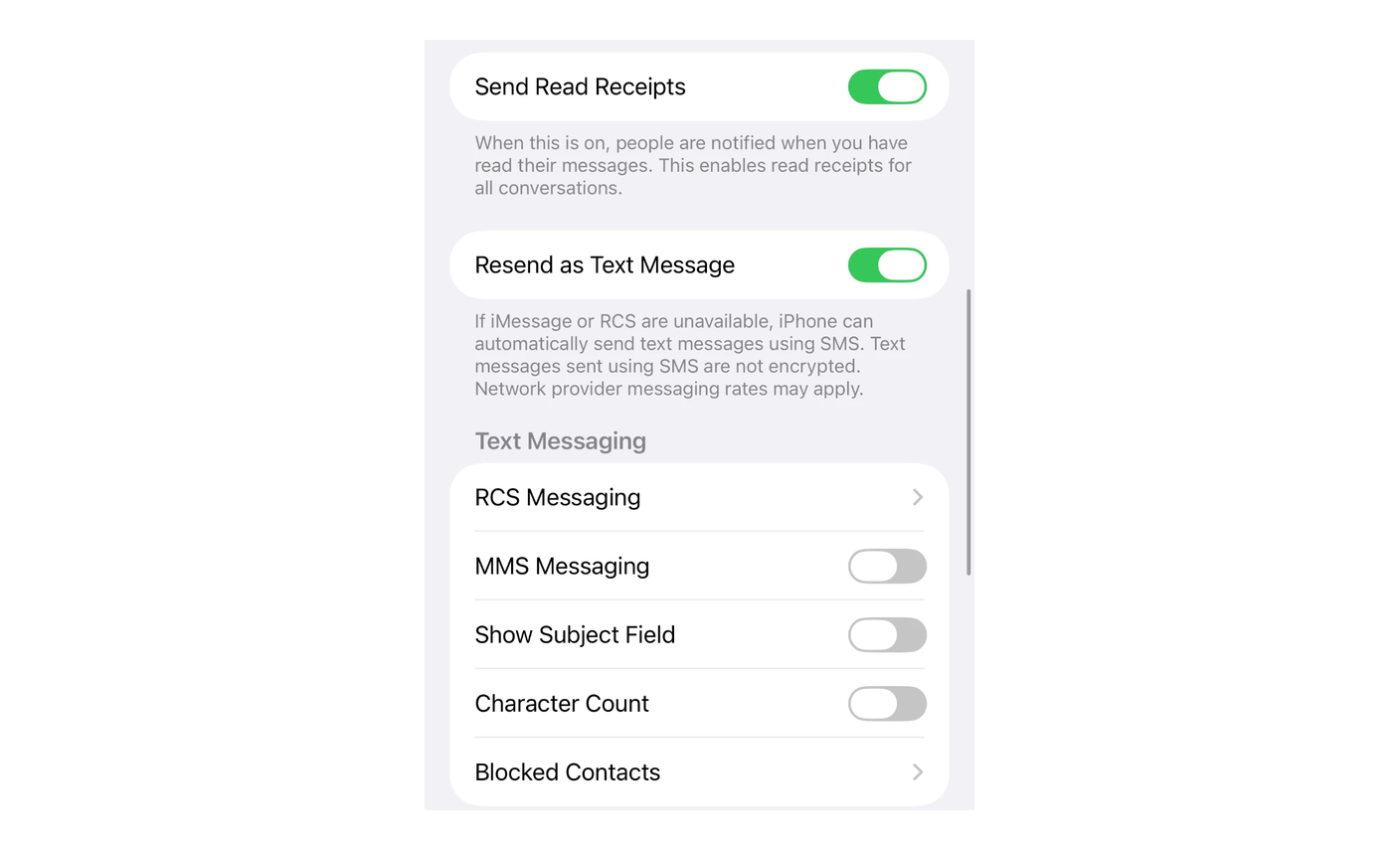 Settings > Apps > Messages on iOS 27, before any change. Resend as Text Message is still on, that’s the switch to turn off. MMS Messaging is already off.
1. Resend as Text Message. Some English versions of iOS call it Retry as Text Message. Apple says it in plain words right under the switch, “Text messages sent using SMS are not encrypted.”
When on, it resends as SMS on its own when iMessage and RCS are unavailable. Turn it off. The option to send it as a text message stays on the failed bubble, but you are the one who taps it. Turning it off only protects what you send, a contact can still text you by SMS or MMS.
2. RCS Messaging. It sits in a submenu, Settings > Apps > Messages > RCS Messaging. Turning it off prevents any fallback to unencrypted RCS.
You also lose encrypted RCS, iOS doesn’t let you turn off only the unencrypted version. In France the loss is zero. Orange, SFR, Bouygues Telecom and Free offer RCS, none encrypts it on iPhone yet, so every RCS there goes out in the clear.
If you keep it, leave End-to-End Encryption (Beta) on for the day your carrier catches up. No RCS Messaging submenu on your phone? Your carrier doesn’t offer RCS, and Messages can’t fall back to it.
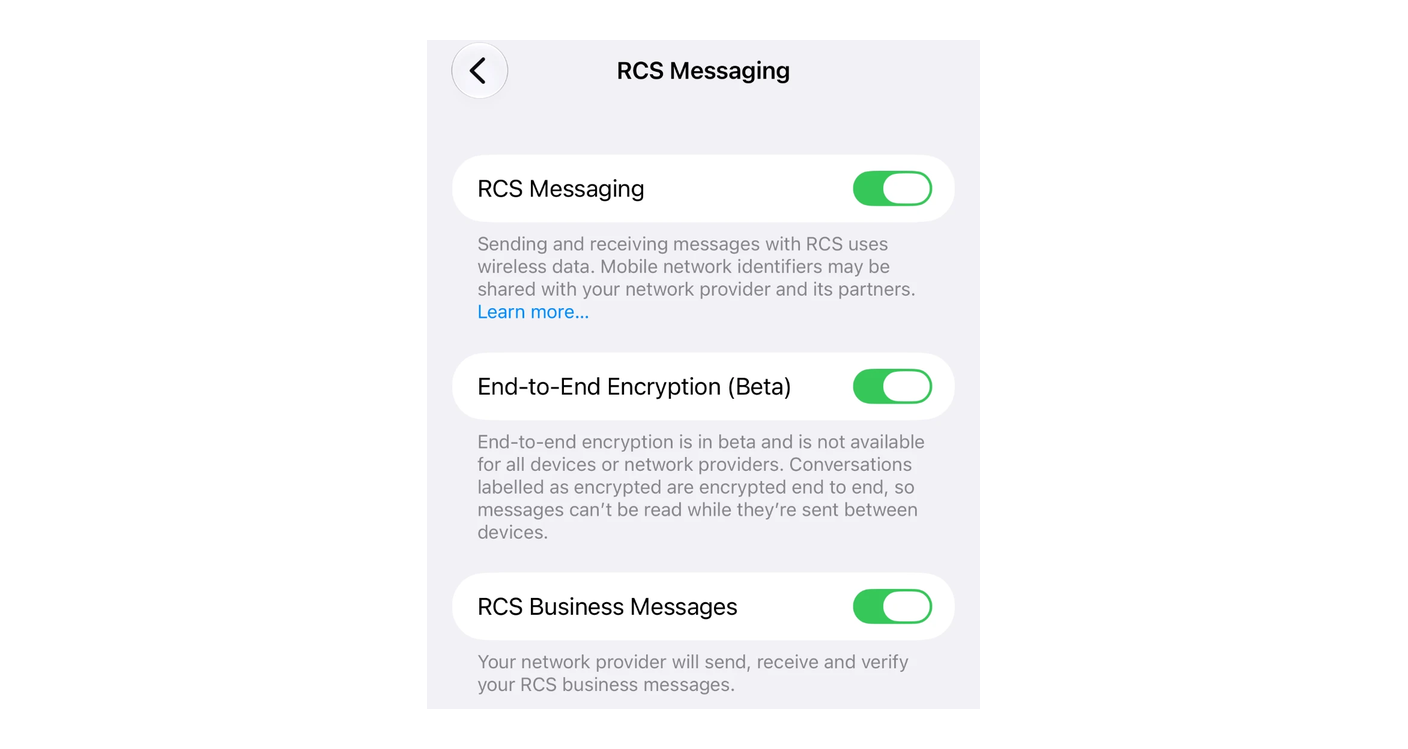 The RCS Messaging submenu on iOS 27. Keeping RCS? Leave End-to-End Encryption (Beta) on. Don’t want it? Turn off RCS Messaging.
3. MMS Messaging. Even with the SMS fallback off, Messages can still fall back to MMS, for a photo or a group. Turning it off closes the last exit in the clear. The trade-off, with RCS off as well, you can no longer send a photo or a group message to a contact without iMessage. Here too, the option depends on your carrier.
Fleishman considers the risk low for most people. These settings matter first for journalists, activists, politicians. And for you, the day you send a sensitive document without checking which channel it goes out on.
A message that stays failed, you see it and decide what to do with it. A message that goes out in the clear, you never know. Turning off these settings puts you in charge of what goes out encrypted and what doesn’t.
Sources
- Six Colors, Glenn Fleishman, Is your secure iMessage conversation actually secure?, October 6, 2026, protocol fallbacks, how Messages flags them, three settings.
- Michael Tsai, iMessage downgrading, October 16, 2026, silent iMessage sign-out.
- Apple, Send a group text message on your iPhone or iPad, RCS Messaging and MMS Messaging settings.
- Apple, What is the difference between iMessage, RCS, and SMS/MMS?, encrypted RCS since iOS 26.5, in beta, depending on the carrier.
- Apple, Wireless carrier support and features for iPhone in Europe, RCS Messaging at Orange, SFR, Bouygues Telecom and Free, without end-to-end encryption.
- Selectra (in French), why encryption of messages between iPhone and Android still hasn’t reached France, September 25, 2026, no French carrier on Apple’s list.