MCP servers, the backdoor into your AI
MCP servers give your AI real access to your Mac: files, shell. Handy, but it's a backdoor. Here's how to lock it down.

The convenience that sets you up
You install Claude Desktop on your Mac. In a few clicks, you wire up a server that reads your files, another that queries your database, a third that runs commands in your terminal. Suddenly your assistant isn’t just chatting anymore, it acts. It opens your documents, rewrites your code, sorts your folders while you sip your coffee.
It’s impressive. It’s also the exact moment you opened a door onto your machine without keeping the key.
These little connectors are called MCP servers. They are the reason your AI went from chatty to useful. They are also the most poorly understood attack surface in the entire 2026 AI ecosystem. And the problem isn’t theoretical: a design flaw in the protocol exposed roughly 200,000 instances to remote code execution, this past April.
Let’s look at what you’re actually plugging into your Mac when you add an MCP. And above all, how to do it without getting burned.
What an MCP actually is
MCP stands for Model Context Protocol. Anthropic published it in late 2024 as an open standard, and everyone adopted it, Claude of course, the Claude Desktop app as well as the Claude Code command-line tool, but also Cursor, Windsurf, and a good chunk of the AI tools you run into.
The idea is simple, almost obvious. A language model, on its own, only knows how to talk. It can’t open a file, read your database, or send an email. MCP is the standard cable that connects your assistant to outside tools. An MCP server on one side exposes a capability, reading files, querying an API, running a command. The assistant on the other side decides when to use it.
Think of a universal socket. Before, each device had its own proprietary plug. MCP is the single socket where you plug in whatever you want: a connector for your files, one for your calendar, one for your Git repo. Your AI reaches into it on demand.
In practice, the flow looks like this. You ask Claude to tidy up your screenshots. The model notices it has a filesystem MCP server available. It calls it, lists your folder, moves the files. You see the result, not the machinery. The server ran a real action on your disk, decided by the model, triggered by your sentence.
That is exactly where convenience tips over into risk.
Why it’s a backdoor
Run the flow again, but watch who decides and who executes.
You write a sentence in plain language. The model, a statistical box nobody controls line by line, decides which tool to call and with what arguments. The MCP server runs whatever it’s asked to, on your machine, with your privileges. Between the three, there’s no bodyguard. Nobody to raise a hand and say “hold on, are you sure you want to delete that?”.
A poorly designed or outright malicious MCP server is a command executor that obeys a middleman you don’t steer. The model can be manipulated by a hidden instruction, a booby-trapped piece of text in a file it reads, a web page you let it open. That’s called prompt injection. The result: your assistant ends up launching an action you never asked for, through a server that has no reason to say no.
And the real trap is in the configuration. An MCP config file isn’t a tidy little list of preferences. It is, in practice, a shell script in disguise. It defines which executables to launch, with which arguments, which environment variables. Loading an MCP config you haven’t read is running a script you haven’t reviewed, and potentially a malicious one. The twist is that this one looks harmless because it’s tucked inside a JSON file.
The word “backdoor” is earned for one precise reason: you see nothing go by. No confirmation window, no visible trace, no alert. The model decides, the server executes, and you watch the result thinking your AI just did you a favour.
The incident that settled the argument
This isn’t a lab hypothesis. It happened, at scale, in April 2026.
On 15 April, the OX Security research team published a report with a not-so-modest title, “The Mother of All AI Supply Chains”. The finding is brutal: the main interface of the official MCP SDKs, the one that makes the tool and the server talk locally, lets a mere configuration trigger the execution of arbitrary system commands. No input validation, no isolation by default.
The numbers are dizzying:
- 7,000 and more public MCP servers indexed
- 150 million and more downloads of the affected SDKs and servers
- roughly 200,000 instances estimated vulnerable
- 10 CVEs issued, including CVE-2026-30615 on Windsurf: a prompt injection via malicious HTML leading to local code execution, rated 8.0 out of 10 in severity
On the Mac side, these aren’t abstract names. Cursor, Windsurf and Claude Desktop use these SDKs, and are concretely affected through their MCP integrations. The researchers validated their attacks on six production platforms. It worked for real.
And here’s the best part, or the worst depending which side you’re on. Anthropic’s response, as reported by OX Security and confirmed several times over, comes down to two words: “by design”. The behaviour is deemed normal, provided the user, or the downstream developer, does the securing work themselves. Anthropic declines to change the protocol.
The argument holds up on paper. A protocol isn’t a sandbox, and no standard is obliged to fence off every use. Except that in practice, Anthropic hands the responsibility for locking down to people who never signed up for it: the individual installing Claude Desktop with no notion of security, the small business plugging in a connector found on a public repo. The fixes come from the downstream tools, Cursor, Windsurf and the others, not from the protocol itself.
Translation: the sandbox is your problem. Better to know it going in, not after.
Further reading: Anthropic’s MCP, 200,000 instances exposed to RCE, our radar on the flaw and the associated CVEs.
Hardening your MCPs without giving up the convenience
Good news: you don’t have to choose between “AI wired to everything” and “AI unplugged and useless”. The dial can be set. Here’s how to put it in the right spot.
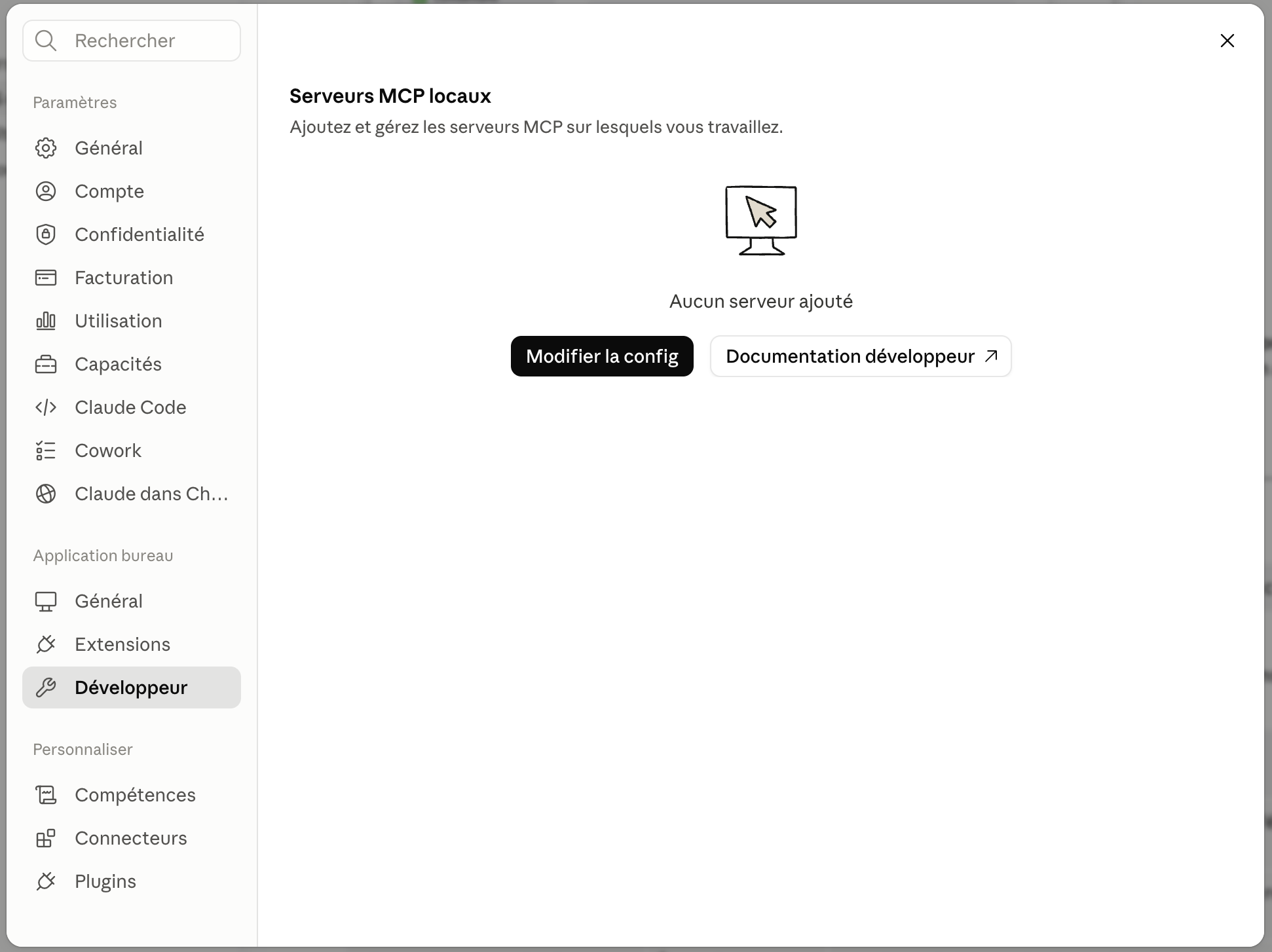
Before diving into the settings, know where it all happens. On Claude Desktop, your MCP servers are managed under Settings then Developer, and the “Edit config” button opens the claude_desktop_config.json file.
When you open it, an MCP config looks like this: a few declared servers, each with its command and its access. Nothing more than a script waiting for its moment.
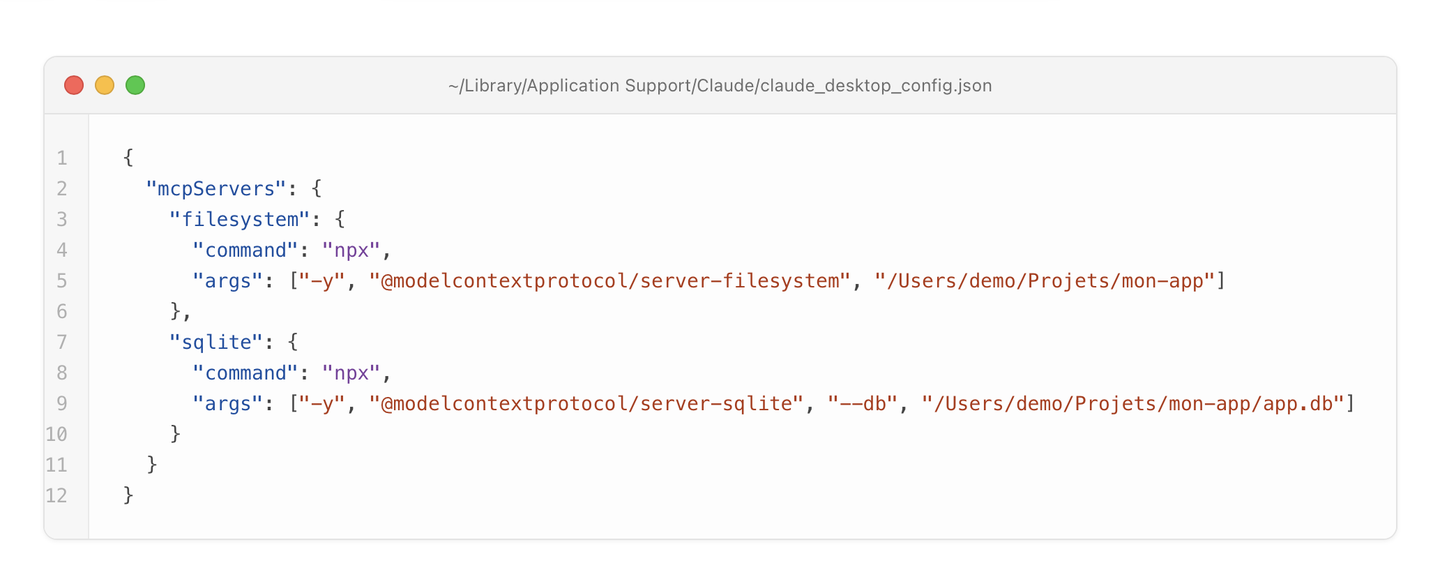
1. Inventory your active MCP servers. On Claude Desktop, go to Settings then Developer, and click “Edit config”: it opens ~/Library/Application Support/Claude/claude_desktop_config.json. On Cursor, go to Settings then MCP. On Windsurf, the list is reachable from the IDE. Disable any server you didn’t deploy yourself or whose code you haven’t read. If you can’t remember why it’s there, it shouldn’t be.
2. Apply least privilege, seriously. A filesystem MCP server should never point at / or at ~. Give it the specific subfolder of the current project, nothing more. Your assistant doesn’t need full access to your disk to tidy three screenshots.
3. Treat any third-party config as hostile by default. A snippet of config grabbed off GitHub, a file shared on Slack, a colleague’s export, a cloned repo: read the configuration in full before enabling it. The executable paths, the commands, the environment variables. Remember it’s a shell script in disguise. Nobody runs an unknown .sh without reading it. An MCP config .json is the same thing.
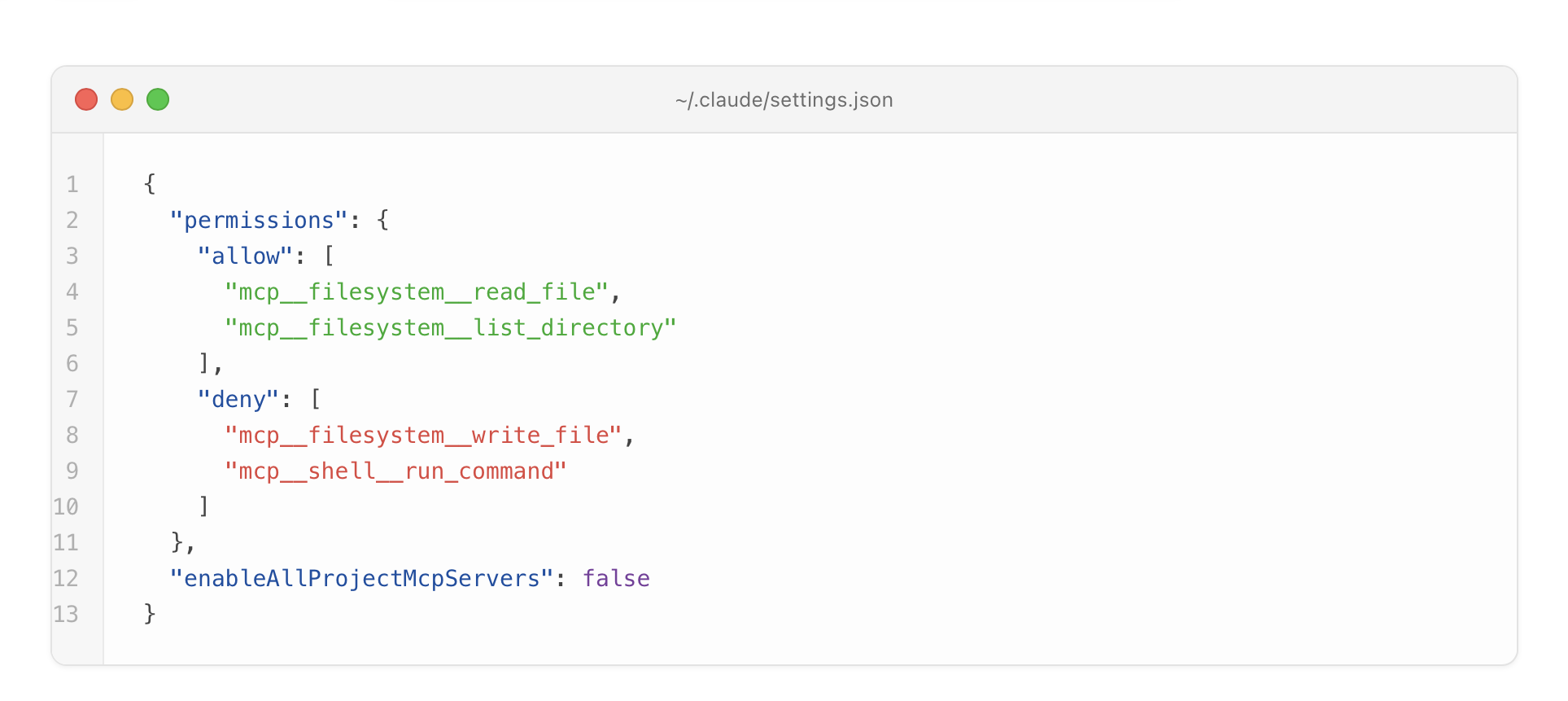
4. If you’re on Claude Code, lock it down through config, not through instruction. You can write a rule in your CLAUDE.md along the lines of “don’t enable any MCP server without my say-so”. That documents your intent, but don’t rely on it: you just read why a model that gets manipulated doesn’t always obey instructions. The real lock is in your settings.json. Keep a whitelist of authorised MCP tools there and refuse the rest with permissions.deny, and leave the approval prompt active for any server declared in a project .mcp.json, never auto-approve it. The CLAUDE.md reminds the human of the rule, the settings.json imposes it on the machine.
5. Lock down the servers that listen on the network. Some MCPs run as a small local HTTP server. Check it’s bound to 127.0.0.1, never to 0.0.0.0. Otherwise, a malicious web page opened in your browser can, in the worst case, trigger execution on your machine.
~ % lsof -iTCP -sTCP:LISTEN -nP | grep node
node    41827 demo   23u  IPv4 0x9f3a5c  0t0  TCP 127.0.0.1:8787 (LISTEN)
node    41902 demo   25u  IPv4 0x9f3b1d  0t0  TCP *:8788 (LISTEN)
The first line sits nicely on 127.0.0.1. The second listens on *, so on every interface: that’s the one you need to fix.
6. Update the affected tools. Cursor, Windsurf, Claude Desktop and the frameworks involved shipped corrective releases starting in April 2026. Check the release notes that the flaw is explicitly addressed, not just “various security improvements”.
7. Prefer local over remote. An MCP server that runs on your machine and exposes nothing to the network is far easier to reason about than a remote connector hosted by a third party. Every outside service added to the loop is one more company that can read what passes through, or get compromised in your place.
And before installing a new third-party MCP server, ask yourself three questions. Who wrote it and is the code inspectable? What access does it actually need, and does the config ask for more? What happens the day this server gets compromised? If you can’t answer all three, don’t install it.
In short
MCPs are what make your AI assistant genuinely useful. They are also what connects it to your files, your database, your shell, with your privileges and with no witness. The model decides, the server executes, you see nothing go by. That’s the definition of a backdoor, and April 2026 proved it was wide open for roughly 200,000 installs.
Sovereignty, here, isn’t about unplugging your AI. It’s about knowing what’s plugged in, granting only the strict access needed, and never loading a config you haven’t read. A local MCP server, tightly scoped, whose code you’ve read, is a tool. The same server, pulled from an unknown repo with access to your whole disk, is a vulnerability with a friendly interface.
Inventory your MCPs. Cut the ones you don’t recognise. Trim the access of the ones you keep. The rest is just the good habits you already have for the rest of your machine.
Also worth reading: Your AI can be turned off by the US, build your own and Apple Intelligence, what really leaves your Mac.