Proton Meet, end-to-end encrypted video calls
Proton encrypts your calls end-to-end using MLS. Even Proton can't snoop on your meetings. How it really differs from Zoom, Teams, and Google Meet.
Introduction
You’re scheduling a Zoom meeting with your accountant to discuss numbers, or a Teams call with a client to finalize a contract. You trust the lock icon in the browser.
Problem: that lock protects data transport, not content. Zoom, Teams, and Google Meet decrypt your call on their servers by default to process video, audio quality, and automatic captions. That’s called “transit encryption,” not “end-to-end.” All three offer an optional E2EE mode, but it disables most smart features and remains invisible to 99% of users.
Proton launched Proton Meet on March 31, 2026. Its promise in one sentence: not even Proton can access your calls, screen sharing, or chat. The encryption keys never leave the participants’ devices. Let’s see what that means concretely, who it’s really for, and where the real limits are.
What Zoom and Teams do with your meetings
Let’s set the context first. When you use Zoom, Google Meet, or Microsoft Teams, your audio and video data is encrypted as it travels between your device and their servers. Nothing shocking so far. But on their servers, that data is decrypted for processing.
Why? Because all the “smart” features you use daily require it. Automatic captions, noise suppression, background blur, adaptive video quality optimization: all of that needs access to the raw content of your call. This model is called “transit encryption,” and it’s perfectly legal and well-documented in the terms of service no one reads.
What that concretely means:
- Zoom can be legally compelled (CLOUD Act) to hand over call content (unless you’ve enabled its optional E2EE mode, which is never the default)
- Google can feed the personal profile associated with your account with call metadata (who, when, duration) if you’re using a regular Google account. In Workspace, Google contractually doesn’t use it for ads. But they keep it anyway (audit, “service improvement,” CLOUD Act). Not zero-knowledge.
- Microsoft Teams stores meeting metadata (who, when, how long, with whom) in its systems
Zoom probably doesn’t systematically listen to your business calls. But legally and technically, it could. That’s the problem, not the stated intention.
How Proton Meet works differently
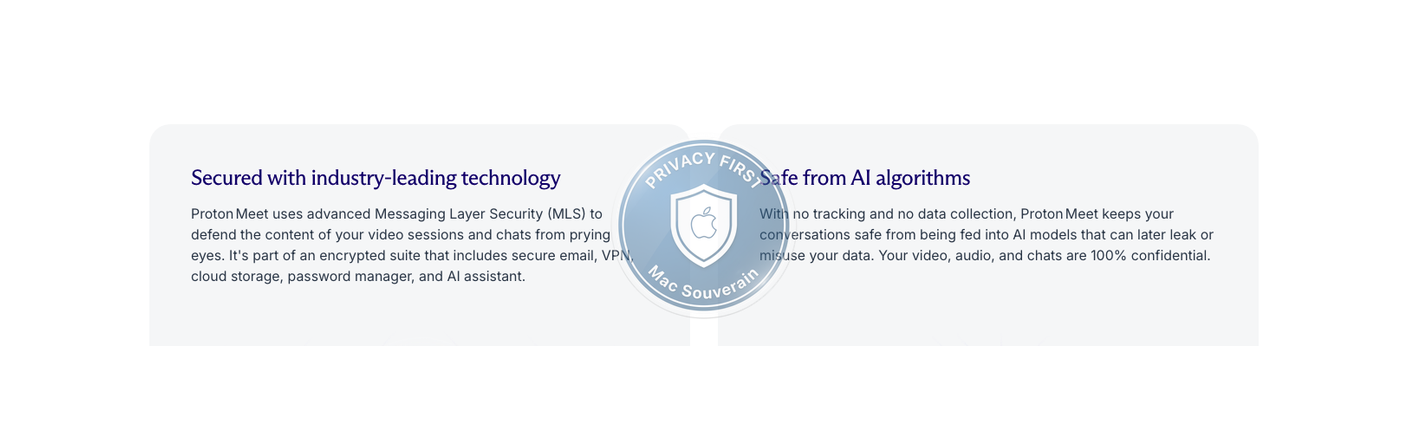
End-to-end encryption, E2EE, changes the game. Your data is never accessible in plaintext on Proton’s servers because the decryption keys never leave your and your interlocutors’ devices.
Proton Meet uses the MLS, Messaging Layer Security protocol, developed by the IETF, the same organization that standardizes fundamental internet protocols. MLS is specifically designed for groups: it efficiently manages participant entries and exits during a call without having to re-encrypt the entire session every time, a technical problem that naive E2EE implementations struggled with.
What that practically covers:
- Audio and video, obviously
- Screen sharing, entirely
- Real-time chat during the call
What “even Proton can’t see” means technically: Proton’s servers see encrypted packets they can’t decrypt. They know a meeting is happening (they manage the signaling), but not what’s being said, shown, or written.
Proton Meet’s code is open source. Proton regularly has its products audited by independent firms (Mail, VPN, Drive, Pass); an audit dedicated to Meet is expected after launch. Open source allows any security researcher to verify that the claims match the actual implementation.
The plans and what they cover
Free version:
- Up to 50 participants
- Maximum duration: 1 hour per call
- Proton account required to create the meeting; no account required for invited participants (a browser link suffices)
- Instant meeting link creation, share with one click
- Screen sharing and chat included
For an independent who wants to have a client meeting without friction, this is immediately usable. You create the link, send it, your client clicks, and the call starts in their browser. No installation or Proton account required for participants.
Meet Professional (starting at $7.99 USD/user/month, included in Workspace plans):
- Up to 250 participants
- Duration: up to 24 hours per call
- Advanced moderation features
- Proton Calendar integration
Proton Workspace (Standard and Premium), for teams:
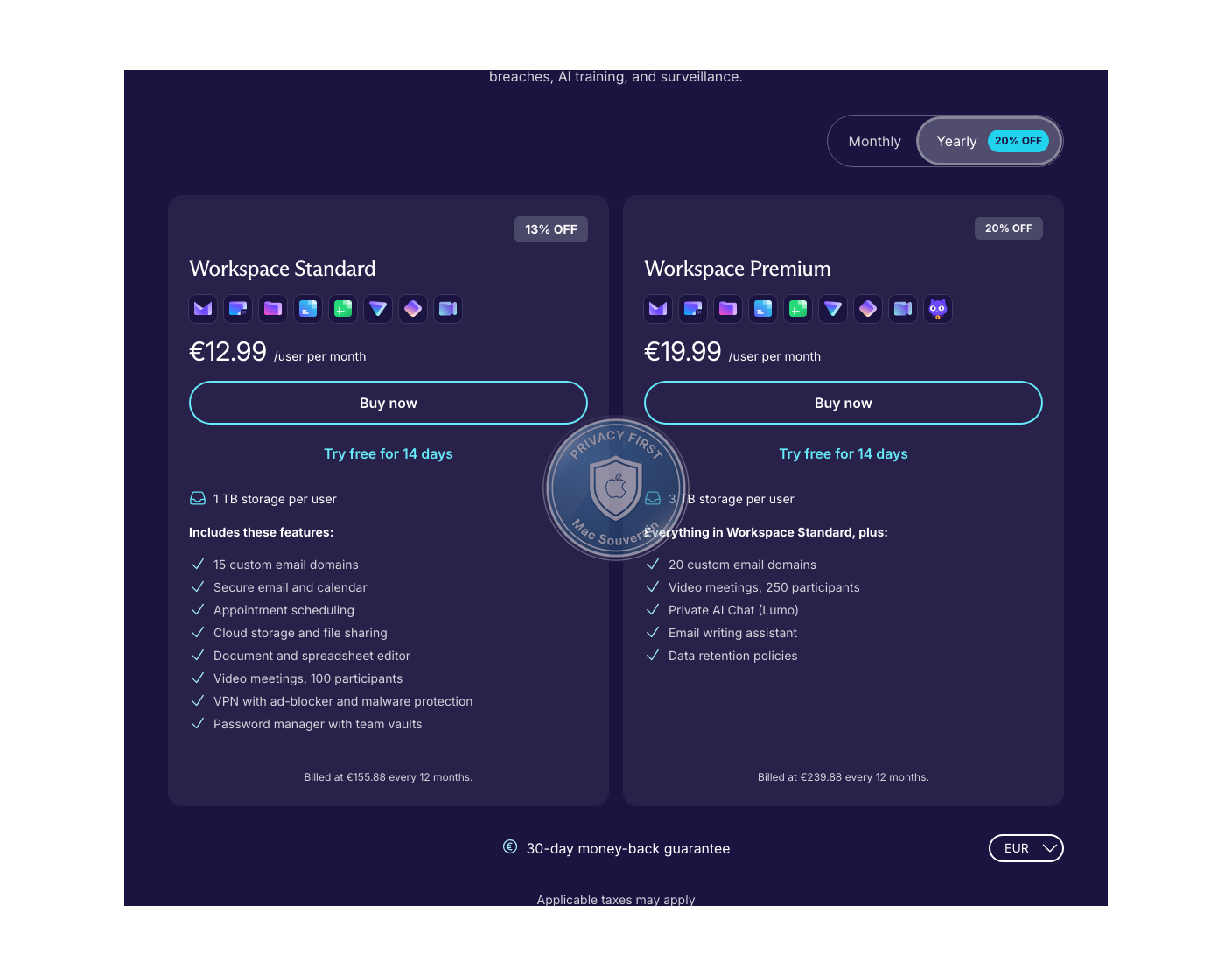
Proton Workspace positions Meet as a component of a complete suite that includes Mail, Calendar, Drive, Docs, Sheets, VPN, Pass (team password manager), and Lumo, an AI privacy-first assistant available on the Premium plan.
Workspace Standard (€12.99/user/month with annual billing): 1 TB per user, Meet up to 100 participants, 15 email domains, Mail, Calendar, Drive, Docs, Sheets, VPN, Pass.
Workspace Premium (€19.99/user/month with annual billing): 3 TB per user, Meet up to 250 participants, 20 email domains, Lumo (AI privacy-first) included, email composition assistant, configurable retention policies.
Workspace targets teams looking to replace Google Workspace or Microsoft 365 with a fully encrypted alternative. It’s the direct PME target: you keep a complete collaborative organization (email, documents, meetings, passwords) but switch to a Swiss jurisdiction with an economic model based on subscriptions, not ads or data resale.
Proton AG is ISO 27001 certified and audited SOC 2 Type II. Workspace is compatible with GDPR, HIPAA, and CCPA.
What that concretely means for an independent or a SME
For situations where confidentiality matters:
Meeting with a lawyer to discuss a dispute. Meeting with your accountant about a restructuring. Exchange with a client sharing sensitive data. Code review with your team on a confidential project (and you should consider all your projects confidential).
In these situations, the difference between “transit encrypted” and “end-to-end encrypted” isn’t theoretical. It’s the difference between a document in an envelope and a document in a safe that the courier can’t open.
Zero friction for your counterparts:
Your client doesn’t need to create an account, download an app, or ask “what’s Proton?” You send them a link, they click, they’re in the meeting from their browser. That’s the level of friction of Zoom or Google Meet, with the level of confidentiality of an architecture fully encrypted end-to-end. That’s the strongest argument to convince your team or a reluctant client.
For remote teams:
If your team is already in the Proton ecosystem (Mail, Drive), Workspace Standard or Premium gives you access to Meet with participant and duration limits that fit most professional uses. The promise of not having to leave the sovereign ecosystem for a video call is real.
What Proton Meet doesn’t do (yet):
No cloud recording on Proton’s side: architecturally consistent with E2EE, the server can’t record what it can’t decrypt. Local recording on the host’s side remains possible if needed (compliance, documentation). No automatic transcription, real-time captions, or AI summaries either: these features require server-side processing of plaintext content, incompatible with strict E2EE. That’s the trade-off: privacy or server-side AI, not both.
Read: Apple Mail vs Gmail vs Proton Mail: the honest comparison
The real limits to know
The free version is limited. One hour per call might not be enough for a wide client interview, workshop, or training. 50 participants is sufficient for most team meetings, but it’s just enough for a webinar.
Migrating your ecosystem has a cost. If your team is used to Teams with its Office 365 integrations, switching to Workspace won’t be seamless. Proton’s docs (Docs, Sheets) are functional but haven’t yet reached the maturity of Google Workspace in advanced collaboration features. It’s a choice, not an improvement across the board.
Third-party integrations are limited. Proton Meet natively integrates with Proton Calendar for inserting meeting links. Beyond that, integrations with tools like Slack, Notion, or CRMs are absent or limited, where Zoom and Teams have years of ecosystem behind them.
The price compared to the competition. The fair comparison isn’t Proton Meet vs another video conferencing service. You need to look at the suites as a whole.
Proton Workspace Standard (€12.99/user/month with annual billing) vs Google Workspace Business Starter (~6.80 €/user/month) or Microsoft 365 Business Basic (~6 €/user/month).
Proton is roughly twice as expensive. Google and Microsoft offer E2EE as an option, but it disables features like captions and transcription. Proton Meet doesn’t offer those features either, but that’s by design, assuming strict E2EE from the start. The price delta is the cost of a complete privacy service that lives off your subscription, not your data.
Read: Proton Bridge + Apple Mail on Mac: encryption without sacrificing comfort
For those in a hurry
Proton Meet is an end-to-end encrypted video conferencing service using the MLS protocol, open source, independently audited, based in Switzerland. Launched on March 31, 2026.
Free plan: up to 50 participants, 1 hour. Your guests join from their browser, no account or installation needed.
Meet Professional: up to 250 participants, up to 24 hours, starting at $7.99 USD/user/month (included in Workspace Standard and Premium plans).
Proton Workspace: a complete suite for teams with Mail, Calendar, Drive, Docs, Sheets, Meet, VPN, Pass, available in Standard and Premium (with Lumo AI included for Premium).
It’s not a universal replacement for Zoom or Teams. It’s the right choice if the architectural confidentiality of your meetings matters to you, or if you’re already in the Proton ecosystem.
If you want a fully encrypted suite for your team without relying on an American infrastructure subject to the CLOUD Act and the 5 Eyes jurisdiction, and you don’t want your data feeding a ad system, Proton Workspace is a very serious candidate to evaluate.
For an independent with client calls under one hour, the free plan with a maximum of 50 participants is more than sufficient. For a team looking to migrate away from Google Workspace or Microsoft 365: Proton Workspace deserves a serious evaluation.
Need tech terms explained? Check the glossary.