The cloud is someone else's computer, so what?
iCloud, Google Drive, Dropbox: Practical, Not Sovereign. What It Means, and How to Take Back Control of Your Data.
Introduction
October 2026 Update. Level 3 of this article, self-hosting your Nextcloud, just showed its downside. A critical flaw in Nextcloud’s built-in Collabora (the richdocumentscode app) lets anyone run commands on the server without a password, and administrators have found backdoors on theirs. As we wrote further down, full control is also full responsibility. The checks to run right now.
You’ve got files on iCloud, or Google Drive, or Dropbox. It syncs everywhere, it works, you don’t think about it.
Then you hear this phrase: “The cloud is someone else’s computer.” And you wonder vaguely if you should worry.
The honest answer: it depends. On what you store there, on who that “someone else” is, and on what you’ve agreed to without necessarily realizing it. This article walks through the mechanism, without sensationalizing but without minimizing, so you can make an informed choice, rather than risk making no choice at all.
The Problem
What “cloud” really means
“Cloud” is a marketing term. What it actually means is simple: your files aren’t on your hard drive. They’re on a server, in a datacenter, owned by a company. When you open a document on iCloud from your Mac, your Mac downloads a copy from Apple’s servers, or from cloud infrastructure owned by American companies in Europe if you’re lucky.
The phrase “someone else’s computer” comes from the free software world, used as a dig against centralization. It’s a bit simplistic, but it has the merit of pointing to something real: you’re using a computing resource that you don’t own, that you don’t control, and whose terms of use can change without your consent.
That’s not a reason to stop. It’s a reason to understand.
Three things you’re giving away without thinking
When you put your files on a third-party cloud service, you’re potentially giving away three things.
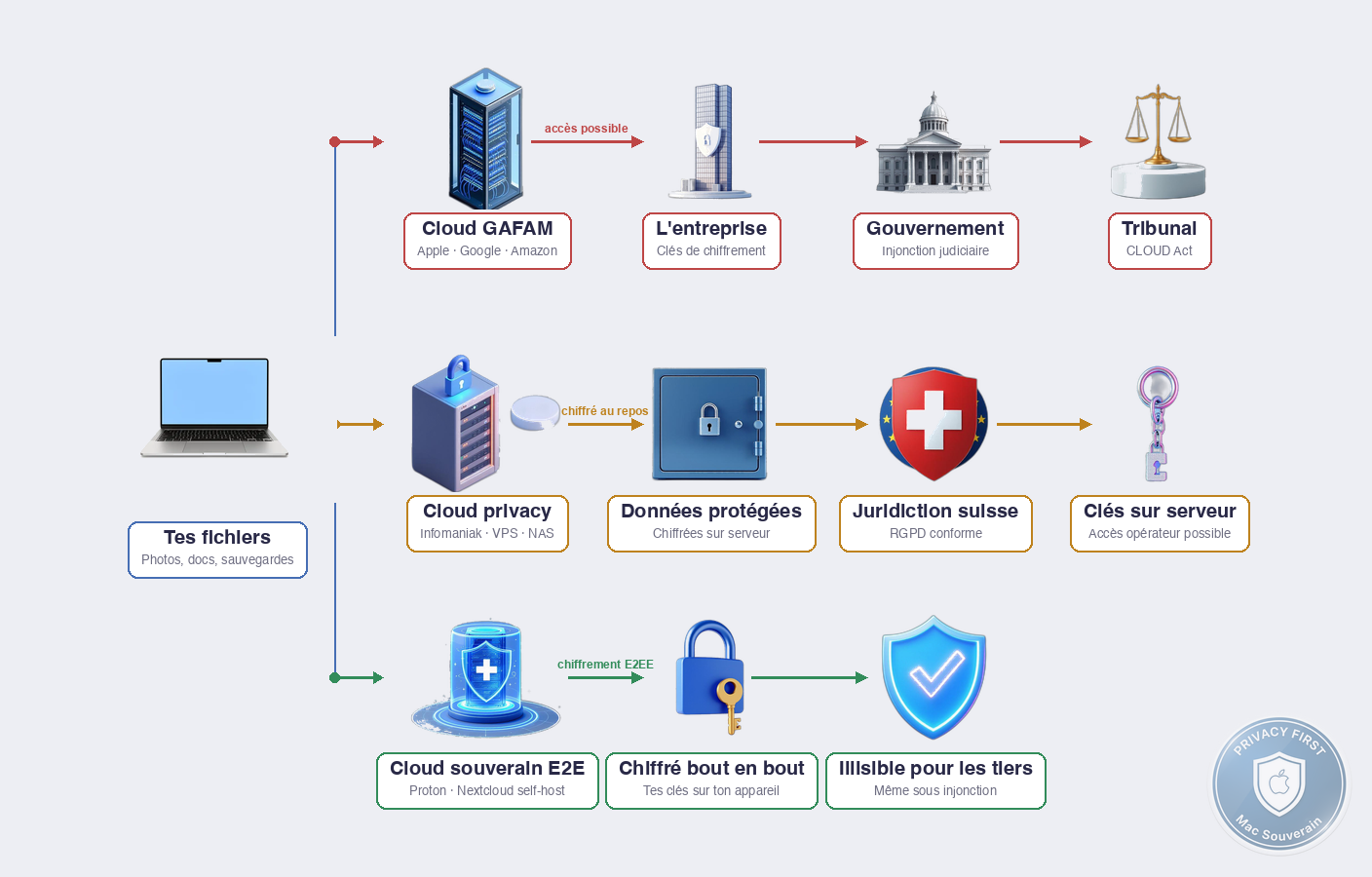
Access. The company can read your files if they want to, or if someone asks them to. With iCloud without Advanced Data Protection turned on, Apple holds the encryption keys. They can therefore access your photos, your documents, your iPhone backups, and hand them over to a government on request. Apple publishes a transparency report: in their transparency report, Apple indicates that they’ve provided data for the majority of American judicial requests.
Continuity. The company can cut off your access at any time. Violation of TOS (real or algorithmically assumed), bankruptcy, merger-acquisition, unilateral decision. Your files are with them, not with you. The day they shut the door, you pick up what they’re willing to let you take.
Jurisdiction. The laws of the country where your files are stored apply, whether you like them or not. iCloud, Google Drive, Dropbox, OneDrive: all under American jurisdiction, subject to the CLOUD Act of 2018. This law allows the American government to demand access to data stored anywhere in the world if the company is American, without going through the usual international judicial assistance procedures. Even your files in a French datacenter.
The Mechanism
How encryption changes (or doesn’t change) the game
The standard response from cloud providers when you raise this issue: “Your data is encrypted.” That’s true. What matters is who holds the keys.
There are two fundamentally different models.
Server-side encryption (the most common). Your files are encrypted on the company’s servers, with keys that the company manages. That’s better than nothing, it protects against pirates trying to break into datacenters, but it doesn’t protect against the company itself, or a judicial request. iCloud without Advanced Data Protection works this way for most data.
End-to-end encryption, E2EE. The encryption keys are generated on your device, not on the servers. The company stores a file that they can’t read, even if they wanted to, even under judicial order. That’s what Proton Drive does by design. That’s what iCloud does for certain categories of data when you turn on Advanced Data Protection.
The practical nuance: E2EE comes at a cost. If you lose your password AND your recovery key, your data is inaccessible forever. The company can’t help you, because they never had the keys.
What “European jurisdiction” really changes
You often hear “My data is in Europe, so I’m protected by the GDPR.” That’s partially true, and partially false.
The GDPR regulates how your data is collected and used within the European Union. It imposes strict rules on companies operating on the European territory. That’s not nothing.
But it doesn’t protect from everything. If the company is American, the CLOUD Act takes precedence in practice. In 2023, the European Commission adopted the Data Privacy Framework (DPF), a new EU-US transfer agreement meant to replace the Privacy Shield invalidated by Schrems II. It’s already being challenged in European courts and its future remains uncertain. In the meantime, if the data is on European servers owned by an American subsidiary, American authorities can theoretically access it anyway.
Jurisdiction matters. But “servers in Europe” isn’t the same as “company under European law with headquarters outside Five Eyes”. Infomaniak, for example, is a Swiss company, with its servers in Switzerland, under Swiss law. That’s not an absolute shield, but it’s a significantly more protective jurisdiction than the US, and outside the CLOUD Act.
The three levels of trust in practice
To see clearly, here’s how to read a cloud service according to this criterion:
Level 1, You trust the company AND its jurisdiction. You’re using iCloud with Advanced Data Protection turned on: E2EE for most data, except iCloud Mail, Contacts, and Calendar which remain excluded (IMAP/CalDAV/CardDAV interoperability constraints). You’re staying with Apple, under American law. Good for everyday use, insufficient for sensitive data.
Level 2, You trust the encryption, not the company. You’re using an E2EE service like Proton Drive or Cryptomator on top of any cloud: even if the company receives an order, they hand over unreadable files. The weak link here is the code itself. If the encryption is badly implemented, or if there’s a flaw in the application, the E2EE promise doesn’t hold. That’s why two things matter: that the code is open source (anyone can verify what’s running), and that it’s been audited by a third party (Proton Drive has been audited by Securitum, code source published on GitHub).
Level 3, You control the infrastructure. You self-host your own storage (Nextcloud on VPS or NAS, or self-host at home on a server). Zero third-party company in the loop. The weak link here is your own security: a misconfigured Nextcloud or a NAS exposed on the internet is worse than iCloud.
What It Actually Changes
For the individual who wants to do better without reinventing the wheel
If you’re using iCloud today, the first thing to do doesn’t cost anything: turn on Advanced Data Protection (Settings → your name → iCloud → Advanced Data Protection). That switches most of your iCloud data to E2EE (exception: iCloud Mail, Contacts, and Calendar, which remain outside E2EE for interoperability reasons). You keep the Apple ecosystem, you get end-to-end encryption on the rest. The only real downside: if you lose access to your account without a recovery key, Apple can’t help you. You note your key somewhere safe.
If you want to go further without leaving the cloud, Proton Drive is the most accessible E2EE alternative: native Mac app, iOS app, web interface, E2EE by default, audited code. Swiss jurisdiction. It’s not the cheapest option, but it’s the best balance between convenience and sovereignty available without technical expertise.
Coming soon: Proton Drive vs iCloud vs Infomaniak, where to store your files?
For the freelancer with client data
The question becomes business, not just personal. Client data in an American cloud under CLOUD Act jurisdiction is a legal and contractual exposure. That’s not hypothetical, it’s the nature of the applicable law.
The question also becomes legal. Since the Schrems II ruling (2020), storing European clients’ personal data on an American cloud without additional protective measures poses a real GDPR compliance problem. Fines are still rare, but the legal risk exists, and a client could raise it. In Europe, the GDPR applies to any company processing personal data. “iCloud is convenient” isn’t an acceptable response to a client or a supervisory authority.
Pragmatic options: Proton Drive (E2EE) or Infomaniak kDrive, both under Swiss jurisdiction and GDPR-compliant for European companies’ data. Or self-hosted Nextcloud if you have the technical expertise. Article #13 details the differences in depth.
What it doesn’t protect against
Cloud sovereignty doesn’t protect against everything. An end-to-end encrypted file in Proton Drive is unreadable to Proton, but if you open it on a compromised Mac, the decrypted file is there, in plaintext, at the mercy of whatever’s running on your machine. Cloud security doesn’t compensate for poor endpoint security.
And a poorly configured self-hosted Nextcloud exposes more than Dropbox. Full control is also full responsibility.
The real cost of sovereignty is also the price. Proton Drive and Infomaniak kDrive aren’t free. iCloud’s 50GB for €0.99/month is unbeatable. You pay for sovereignty, like you pay for Proton Mail E2EE instead of Gmail. It’s a conscious choice, not an obvious one.
Myths
But Apple’s clouds are in Europe
Apple has datacenters in Europe. That doesn’t change that the parent company is in Cupertino, that the master keys for encryption (outside Advanced Data Protection) are managed by Apple Inc., and that the CLOUD Act applies to American companies regardless of the physical location of the servers.
“Servers in Europe” is a useful marketing argument for local GDPR compliance. Not an argument for sovereignty against a federal American injunction.
Sovereign providers are less practical
That was true in 2018. Proton Drive in 2026 has a native Mac app, automatic folder synchronization, file sharing, and a good web interface. Infomaniak kDrive has a proper macOS integration. It’s not as seamless as iCloud Finder, but the gap has significantly narrowed.
I’ve got nothing to hide
The argument is flawed, not because you have nothing to hide, but because it rests on a incorrect assumption: that the problem is what you’re doing, not what others might do with your data.
Your accounting documents in a cloud readable by third parties isn’t a problem if you’ve done nothing wrong. It’s a problem if your data is used to target you commercially, if it leaks during a breach, exposing client data, or if it’s handed over to a government in a way you hadn’t anticipated.
In Summary
The cloud is indeed someone else’s computer. The question isn’t “should we use it”, but “do we understand what we’re agreeing to by using it”.
Three parameters to look at for any cloud service: who holds the encryption keys (you or the company), what jurisdiction applies (not just the location of the servers), and what happens if the company disappears or cuts off your access.
In practical terms: if you’re using iCloud, start by turning on Advanced Data Protection. If you have professional data, look at Proton Drive or Infomaniak kDrive. If you want full control, self-hosted Nextcloud is the next step, but it requires more technical expertise and maintenance.
The detailed comparison of options, with prices, use cases, and real limits of each, is in article #13.
Coming soon: Proton Drive vs iCloud vs Infomaniak, where to store your files?