Your AI talks to ad networks, mute its mic
An IMDEA study measured nine AI assistants. The address, the title, sometimes your message go to Meta, TikTok or Google. What leaks, and the fix on Mac.

You accepted the cookies without reading. Meta received the title of your conversation with Grok.
Not the full text. The address of the conversation, and above all its title, that little summary the assistant generates on its own to file your chats. It goes to Meta, TikTok, X and Google, along with the advertising cookie that already follows you from site to site.
Researchers at the Spanish institute IMDEA Networks put nine AI assistants through the lab, and most of them let pieces of conversation slip to third parties. Here’s what they measured, and here’s how I keep my exchanges between me and the provider I chose. Up to you to adapt it to your own tools.
What the researchers measured
The study is called “Prompt like a Butterfly, Sting like a Tracker”. Signed by Oliveira and colleagues, under the open CC BY 4.0 license, it will appear in the proceedings of PoPETs 2027, the reference conference on privacy.
- Nine assistants, ChatGPT, Claude, Gemini, Grok, Mistral’s Le Chat (renamed Vibe at the end of May), Perplexity, DeepSeek, Copilot and Meta AI, on the web and in their Android apps (except Gemini, whose Android traces couldn’t be extracted).
- Scripted conversations in May 2026, as a guest, on free and paid plans, cookies accepted then refused, in normal and incognito mode.
- All network traffic recorded, in Chrome and on Android, then sorted between the service and third parties.
The baseline finding is that all nine contact at least one advertising or tracking service.
124 third-party domains in total, tied to 44 organizations, 34 of which do advertising or tracking. Six web clients out of nine let pieces of conversation go out, the address, the identifier, the title, sometimes your message or a screenshot.
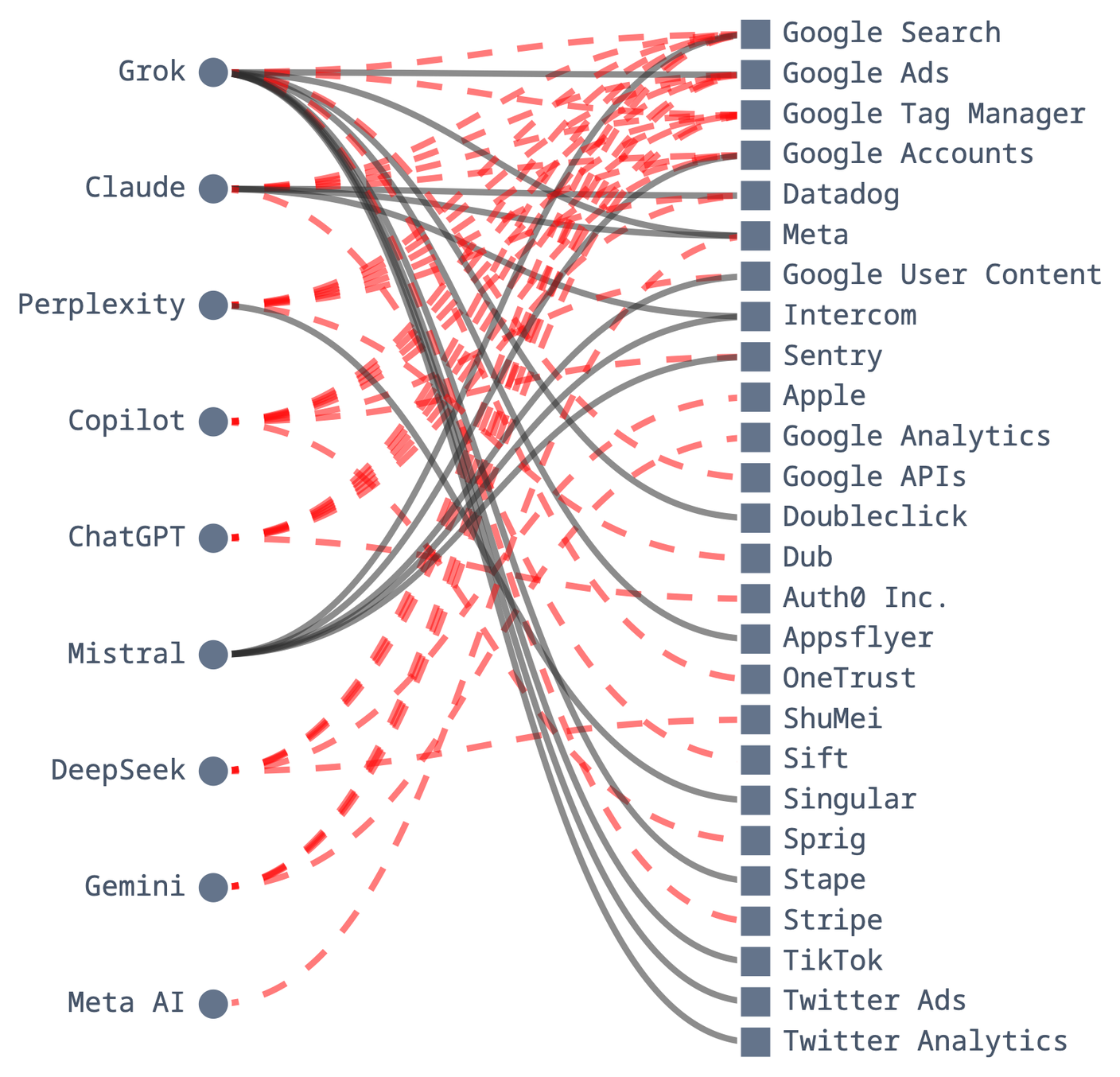
On the web. Dashed lines show what goes out even if you refuse cookies, solid lines what waits for your consent. Graph Oliveira et al., IMDEA Networks, CC BY 4.0, cropped excerpt.
On Android, the picture changes. Fewer ad networks than on the web, more measurement and attribution tools, the ones that track where installs come from and what you do in the app. And no cookie banner, accepting the terms of use is enough to switch everything on.
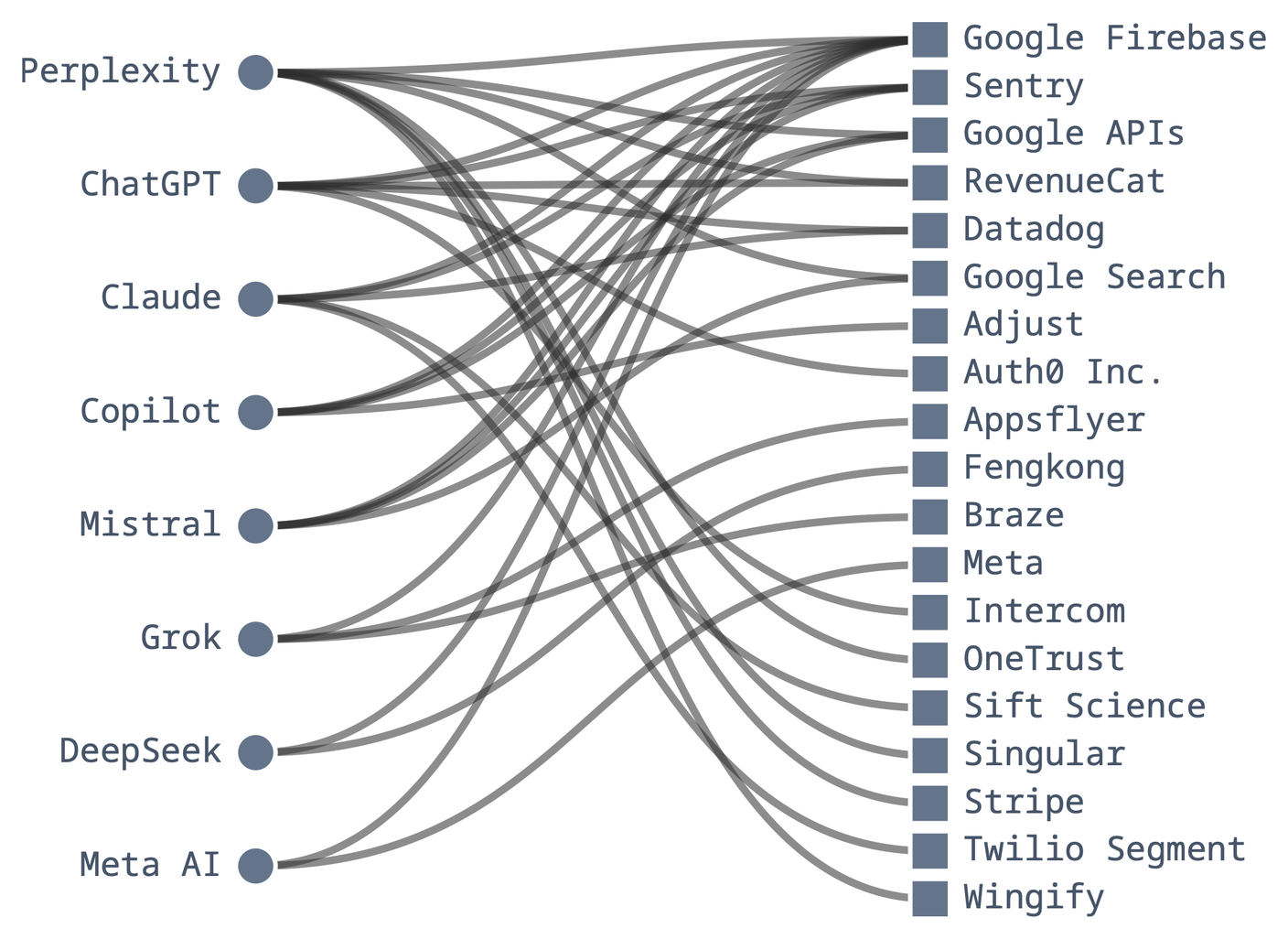
On Android, everything is a solid line, since accepted terms of use count as consent. Graph Oliveira et al., IMDEA Networks, CC BY 4.0, cropped excerpt.
One caveat. A tracker receiving a piece of data doesn’t mean it gets sold, and the study doesn’t prove Meta reads your conversations. It shows the address and the title land with Meta, right next to the cookie that already knows who you are. That’s already huge, and frankly serious. You tell your assistant things you’d never type into a search engine.
And the title is the detail that hurts. Every conversation gets one, generated automatically, and it sums everything up. For a question about the early symptoms of Parkinson’s, Grok filed the conversation under “Early Parkinson’s Disease Symptoms”. It’s the label stuck on the folder, nobody needs to open it to know what’s inside.
At Grok, Gemini and Le Chat, that title goes to the trackers. And it isn’t shy. For a housing question, Grok and Claude both slipped the salary into the title, “Mortgage affordability on $85k salary in NYC” at Claude. The study didn’t see Claude send that title, but with cookies accepted, what its relay passes on to the ad networks escapes any measurement.
The chattiest, ranked
From the chattiest to the most discreet, in a subjective ranking that’s mine alone. The study doesn’t rank the services. I ordered them from its tables, weighing what goes out (address, title, message, screenshot), to whom (ad network or mere measurement tool), and whether refusing cookies changes anything. With other criteria, the order would shift.
Grok, by xAI
Far ahead. With cookies accepted, a single conversation goes out to seven trackers, Meta, TikTok, X and several Google services, with the address and the title. Part of it goes through a relay, an intermediary server built with Google’s tools, which forwards it to Meta and TikTok itself, invisible to blocklists that don’t know that address.
Sharing makes everything worse. Links are public by default. When someone opens a shared conversation and accepts cookies, their choice, not yours, Meta and TikTok receive the title and your last question, and TikTok receives an image preview of the conversation.
The published example shows a question about a biopsy result, “my doctor said stage 2”. The trap links the researchers slipped into Grok conversations were opened 70 times, from 14 countries.
The one consolation, on the web, for your own conversations, all that traffic waits for you to accept cookies. Refusing cuts it. Grok is the one service where refusing really works.
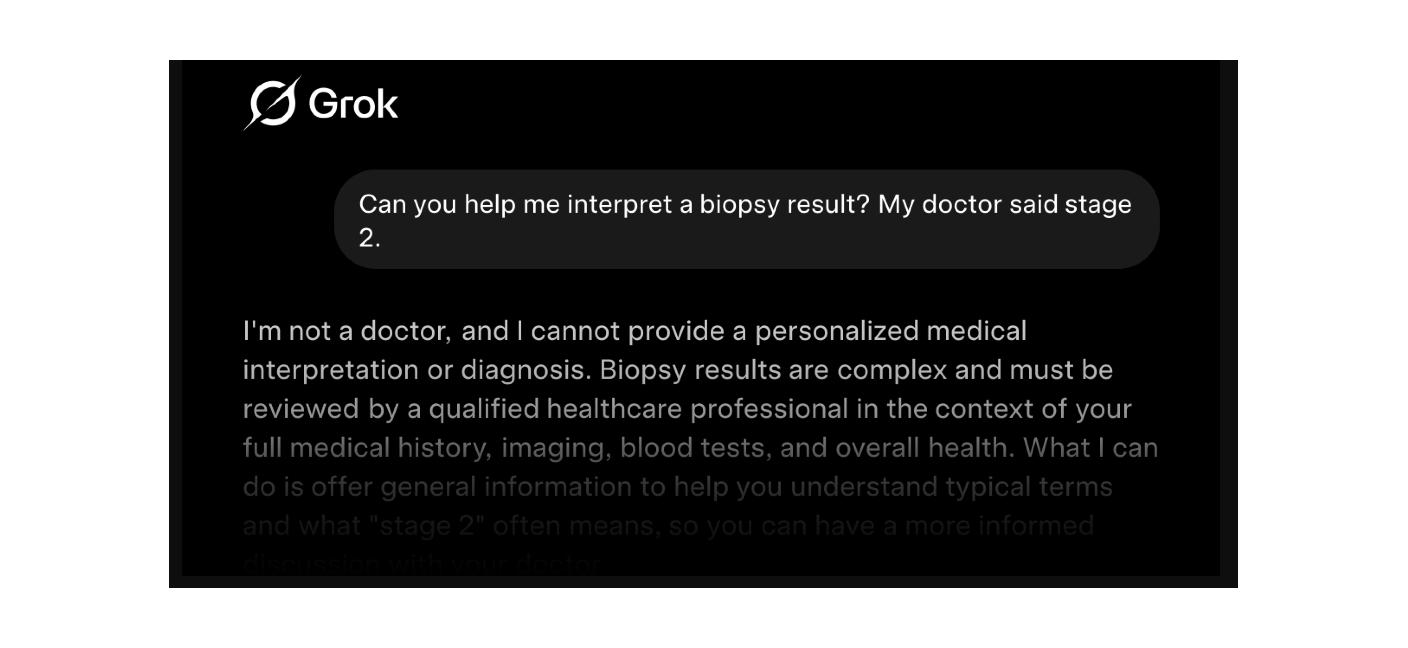
The automatic preview of a shared Grok conversation, as it goes to TikTok. Image Oliveira et al., IMDEA Networks, CC BY 4.0, cropped excerpt.
Perplexity
The address of your conversations and your email go to Datadog, a performance monitoring service, even after refusing cookies. Its Android app, as a guest, sends your message to Wingify, an A/B testing tool. According to the researchers, Perplexity stopped passing its conversation addresses to ad networks like Meta on April 3, possibly under pressure from a lawsuit in the United States. The May measurements still show flows to Datadog and Wingify.
Claude, by Anthropic
The conversation identifier goes to Datadog, the address with your email to Intercom, the tool behind the support bubble. If you accept cookies, your actions on the page also go through an Anthropic domain, then its servers pass them on to 11 advertising platforms, including Facebook, LinkedIn, TikTok and Google.
It’s the restaurant waiter who, once in the kitchen, phones your order to eleven caterers down the street, and you never heard a thing.
Refusing cookies cuts a lot there, the Meta pixel, Datadog and the relay to the 11 platforms. Except Anthropic files Intercom among its “necessary” cookies, which can’t be refused. With that permanent flow, the conversation address and your email are sent no matter what.
Le Chat (now Vibe), by Mistral
The French assistant sends the address, the title and your email to Intercom. And no refusal is possible, you have to accept its terms of use and privacy policy to start, with no button to say no. For the French champion everyone cites on the sovereignty shelf, it’s a complete miss.
ChatGPT, by OpenAI
The address of your conversations goes to Datadog, even after refusing cookies. Only its paid plan remembers your cookie choice durably on the web, and according to the study, no free service does.
Gemini, by Google
The conversation title goes to Google Analytics, even after refusing cookies. Google is both publisher and tracker here.
DeepSeek, Copilot and Meta AI
During the measurements, none of the three let the address, title or content of a conversation go out. That doesn’t mean they talk to nobody.
- DeepSeek contacts Google Ads even after refusing cookies, and embeds two little-documented Chinese services, Fengkong and ShuMei, associated with device fingerprinting, a way to recognize you without a cookie.
- Copilot also contacts Google Ads after refusal, and its Android app sends your advertising identifier to Adjust, a service that measures where app installs come from.
- Meta AI sends your Android phone’s identifier… to Meta. No need for a third-party tracker when the publisher is an ad network itself.
And the study warns it measures a minimum. Not seeing a leak doesn’t guarantee there isn’t one.
Refusing cookies isn’t enough
Two figures, and they don’t measure the same thing.
- Across all the trackers spotted, 80.8% stay active after refusing non-essential cookies.
- Of the 9 services in their free version, 4 still let trackers collect after refusal, that is 44.4%. The study doesn’t name them, according to its tables they’re ChatGPT, Gemini, Perplexity and Claude. DeepSeek and Copilot do contact Google Ads after refusal, but they’re not part of this count.
The banner goes away, the flows from ChatGPT, Gemini and Perplexity carry on, and so does Claude’s Intercom flow. If you accept, the server-side relays of Grok and Claude also slip under the radar of blocklists. Refusing still helps, at Grok it cuts everything related to the conversation, at Claude the bulk of it.
My fix
The cookie banner depends on the service’s goodwill. The outgoing firewall depends only on you. I filter on the way out, then add a few no-tool habits.
An outgoing firewall, a list and targeted rules
An outgoing firewall sees every connection an app tries to open and lets you refuse it. Two serious candidates on Mac, Little Snitch (version 6.5, paid, with a free demo mode) and LuLu (free and open source). The full face-off is in our comparison.
- A blocklist maintained by third parties, for the bulk of known tracking. I use HaGeZi Multi Light, over 130,000 ad, tracking and telemetry domains, in its light version to limit breakage. In Little Snitch, “Add Blocklists…”, in LuLu, Settings > Lists.
- Per-domain deny rules, for what the list misses. And it misses some. Datadog and Intercom aren’t in it, yet they’re precisely the ones receiving conversation addresses at ChatGPT, Claude, Perplexity and Le Chat. Nor is Sentry. These are the rules I detail below with Claude.
For these rules, table 8 of the study lists the advertising and measurement domains the assistants allow themselves to load, a potential more than observed traffic. Datadog isn’t in it, but it’s the one the study saw receiving the conversation addresses or identifiers of ChatGPT, Claude and Perplexity. I add it, along with Intercom’s other domains, and Sentry.
googletagmanager.comgoogle-analytics.comgoogleadservices.comdoubleclick.netfacebook.netanalytics.tiktok.compixel-config.reddit.combat.bing.comintercom.io,intercomcdn.com,intercomassets.com,intercom.helpandintercom.comdatadoghq.com,browser-intake-datadoghq.com,browser-intake-us5-datadoghq.comanddatadoghq-browser-agent.comsentry.io
Datadog deserves four entries, it scatters its collection across separate domains. browser-intake-us5-datadoghq.com isn’t a subdomain of datadoghq.com, and blocking the latter alone lets traffic through, I saw it on my own Mac.
Blocking Intercom makes the support bubble disappear on the services that use it, and intercom.help makes the help centers some publishers host there unreadable. Don’t block google.com or facebook.com entirely in a global rule, you’d break your account logins with them (if you have any).
One LuLu limitation. It only filters by domain name for apps that use Apple’s standard networking tools. Safari is one of them, but not every app is. And these domains come from the study and from my monitor, nobody has published a test showing that cutting them breaks nothing on these assistants. Hence the method that follows, observe, cut, check.
The Claude Desktop example, to adapt to your apps
I illustrate with the Claude app for Mac, the one I use. Claude is part of the study, on the web and on Android. Its desktop app, though, wasn’t measured, and the method works for every app.
After reading the study, I looked at who the app was talking to, and the third-party telemetry jumped out. I denied Datadog, Intercom, Sentry and Google Tag Manager at the firewall, and the app works perfectly normally.
The method comes in six steps.
- Observe. Open Little Snitch’s Network Monitor, filter on the Claude app, use it normally for ten minutes and note every domain contacted.
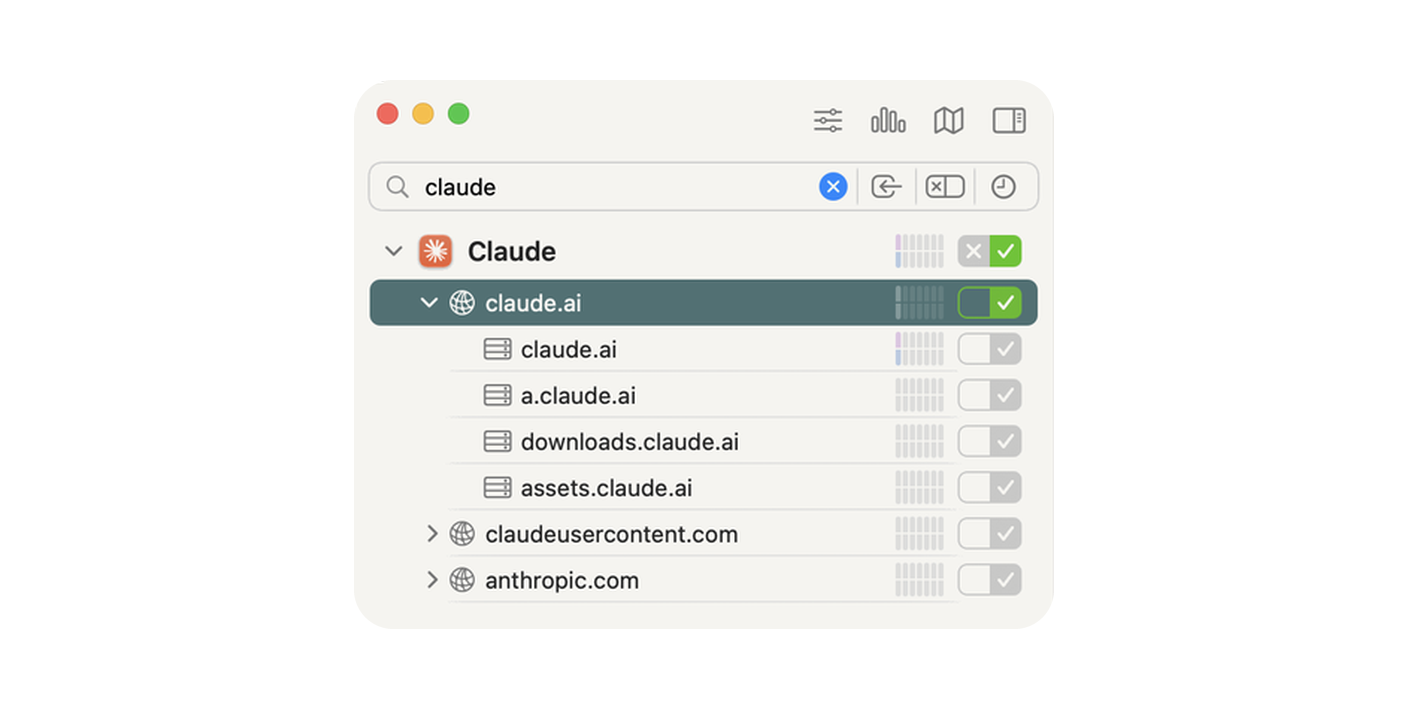
- Sort. On one side what makes the app work (
claude.ai,api.anthropic.com), on the other performance monitoring, support, crash reports, tracking. In its documentation for companies going through a third-party cloud, Anthropic files Sentry and Datadog under its “essential” telemetry. Essential for them. Intercom and Google Tag Manager, I spotted myself in the monitor. - Deny. One rule limited to the app, which can list several domains. In Little Snitch, ”+” button, Deny action, Claude process, Outgoing direction, then the domains.
- Datadog, the four domains listed above
- Intercom,
intercom.ioandintercomcdn.com - Sentry,
sentry.io - Google Tag Manager,
googletagmanager.com - and on my side
google.com, but only for the Claude app, which has no reason to go there. A rule limited to one app can afford to be much stricter than a global rule.
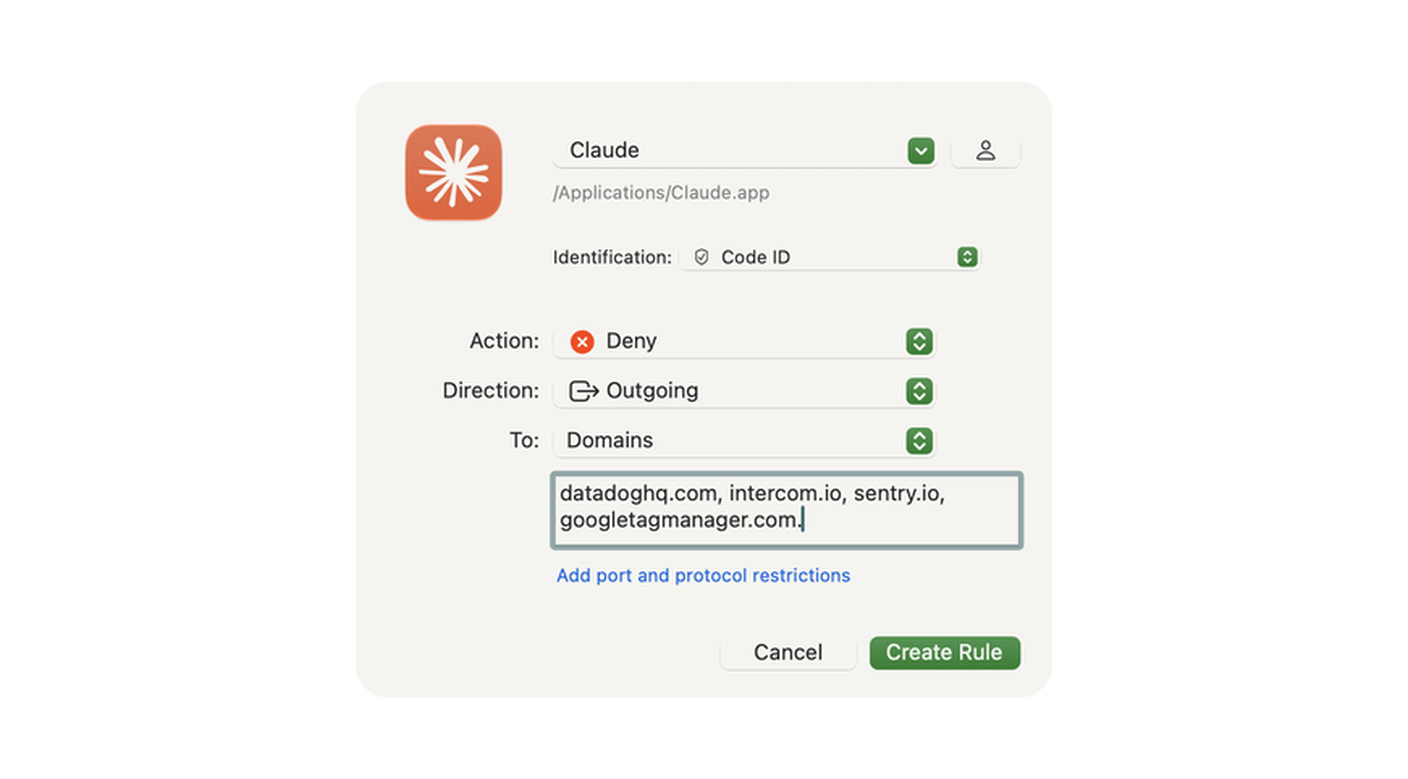
Partial screenshot, add the three other Datadog domains and intercomcdn.com.
- Check. Relaunch the app, open a conversation, send a file. If everything works, you keep the rules. You lose the built-in support chat and the sending of crash reports. If a feature breaks, remove the last domain you added.
- Flip the switches. In your account’s privacy settings, turn off the use of your conversations to improve the models. The firewall doesn’t handle that.
- Adapt. Same method for ChatGPT, Perplexity or Gemini on Mac. Their domains differ and nobody has published the inventory, so observe before you block.
No-tool habits
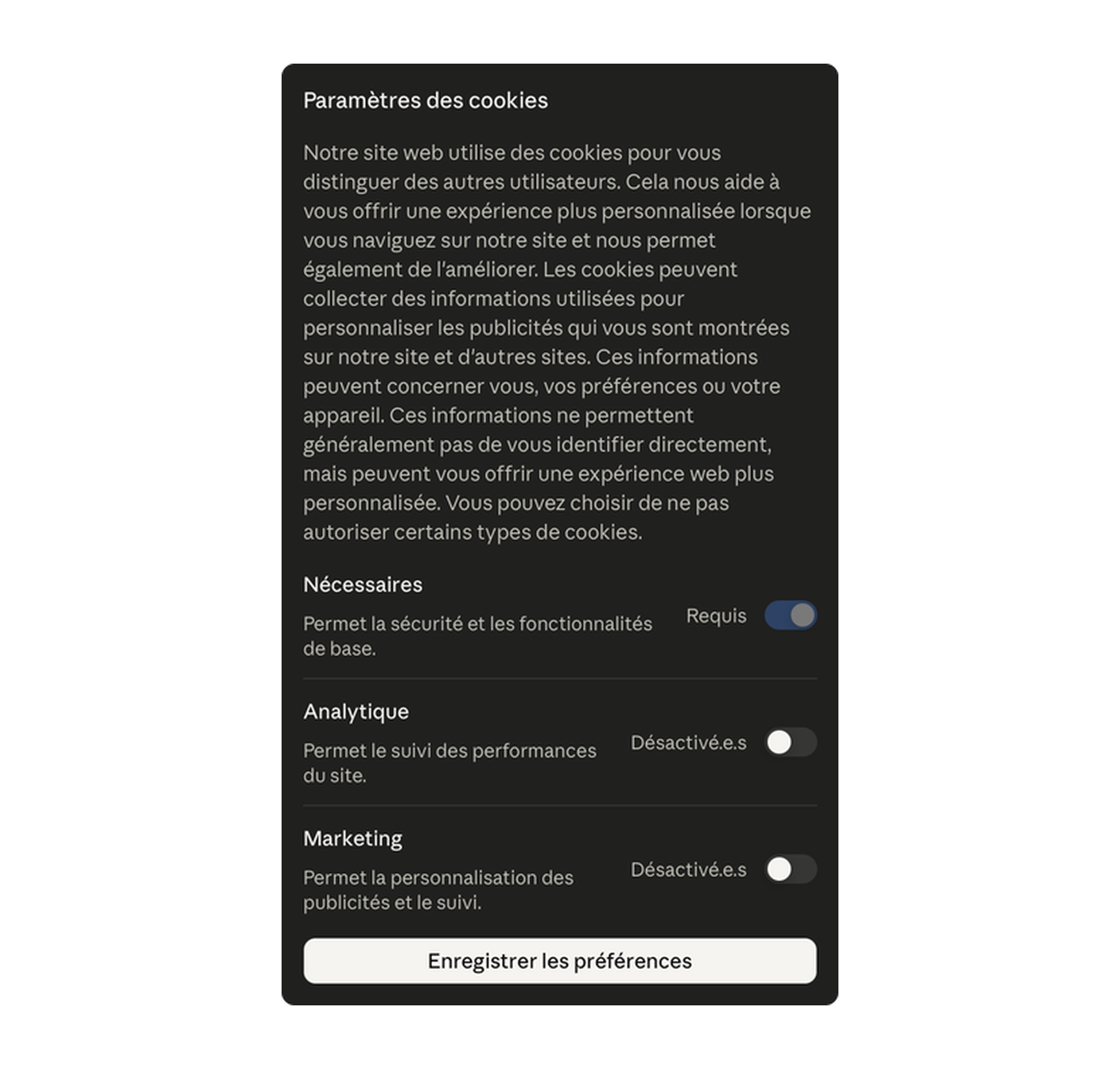
- Refuse cookies where it cuts something, at Grok and Claude above all. On free plans, nowhere is your choice guaranteed to last, check it from time to time.
- Never share a conversation by link. Wherever sharing exists, the shared conversation can be read without logging in. And at five assistants, nine trackers in total receive the address of shared pages.
- At Grok, check in the settings that public sharing is off and delete your existing links.
- Switch to incognito or temporary mode when it exists. It keeps your exchanges out of your history, not out of the trackers. Flows persist in incognito at most of them, Grok first, but also ChatGPT, Claude, Perplexity, Gemini and Le Chat.
- Keep the sensitive stuff to yourself. Health, money, legal, avoid discussing them with an online assistant. Even with cookies refused, most let something slip, Le Chat doesn’t even let you refuse, and a shared link escapes your own refusal.
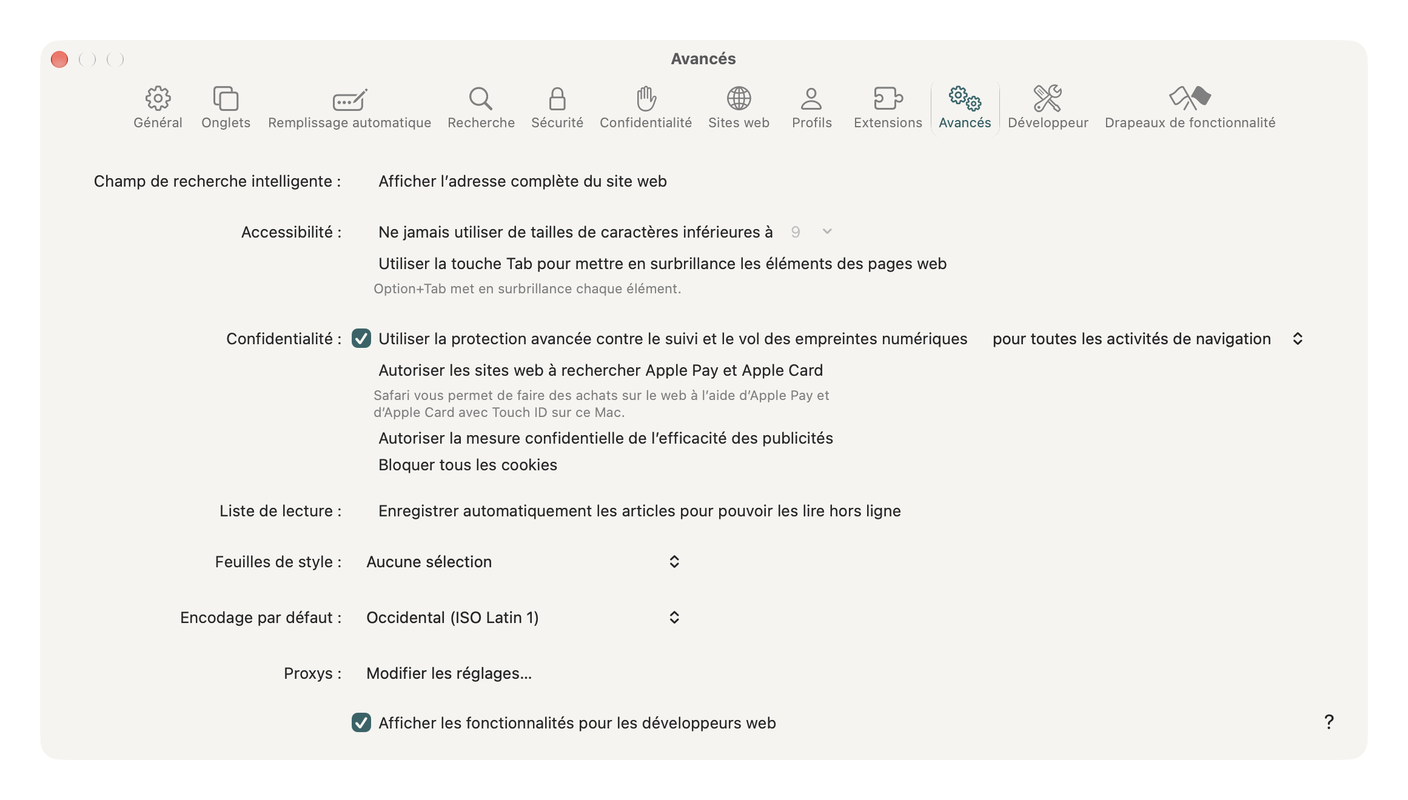
- Turn on Safari’s advanced protection for all browsing. Safari > Settings > Advanced, “Use advanced tracking and fingerprinting protection”, option “in all browsing”. It blocks part of the trackers on the browser side, without changing anything about what servers pass to each other.
What the fix doesn’t cover
With the right rules, the outgoing firewall cuts everything your Mac sends to trackers itself, server-side relays included, since your browser contacts the relay first. You just need to target its domain too, the one you spot in the monitor. Four things still escape it.
- What the provider does with your conversation on its side. It necessarily receives it, it’s the one answering you.
- What goes through the service’s own domain. You can’t block it without cutting the service.
- Your iPhone. Little Snitch and LuLu protect the Mac, not the phone.
- Domains that change. A rule that’s right today may miss tomorrow’s domain, so glance at the monitor from time to time.
The study’s limits, and what came next
The study measured websites in Chrome and Android apps. It tested neither Safari, nor iPhone and iPad apps, nor Mac apps. On my Mac, I looked at Claude. In Safari as in the desktop app, I saw Datadog and Intercom go by, the two recipients the study notes at claude.ai. For your other apps, it’s up to you to look, network monitor in hand. And the authors present their figures as a lower bound, a snapshot of May 2026 on services that change every week.
The follow-up remains thin. The Spanish data protection authority brought the issue before its European counterparts at the end of May. The European Data Protection Board took note of it at its June plenary, with no public decision to date. And as of September 10, according to the researchers, Grok was still exposing its conversations through public links, with no response from xAI.
In short
Your AI assistant doesn’t need a hidden microphone. It carries the same trackers as any shopping site, with far more to lose for your privacy, and your conversation travels with them. Refuse cookies where it helps, share nothing by link, filter on the way out what your apps say behind your back. Start with the one you open most, ten minutes of network monitor are enough to know who it talks to.
Read, Little Snitch vs LuLu, which outgoing firewall for your Mac
Read, Google Ads and a real shared Claude chat drain your credentials
Technical terms? Check the glossary.
Sources
The study and its authors
- Prompt like a Butterfly, Sting like a Tracker, Oliveira et al., IMDEA Networks, forthcoming in PoPETs 2027, under the CC BY 4.0 license. The source of every figure in this article.
- IMDEA Networks, the Spanish research institute behind the study, its presentation of the first results in May 2026.
The data protection authorities
- AEPD, the Spanish authority, its note of May 27, 2026 bringing the file before its European counterparts.
- EDPB, the European Data Protection Board, the minutes of its June 8-9, 2026 plenary, where it takes note of the Spanish report.
The publishers themselves
- Anthropic, its list of cookies, where Intercom appears among the necessary cookies.
- Anthropic, Claude Desktop telemetry, detailing the crash reporting and measurement services used by the app.
The tools
- HaGeZi, the community-maintained DNS blocklists, including the Multi Light used here.
- Objective Development, the Austrian publisher of Little Snitch, its documentation on blocklists.
- Objective-See, the publisher of LuLu, free and open source.
- Apple, the Safari guide on advanced tracking and fingerprinting protection.