Wazuh, write the rule that catches what you're really after
Writing a custom Wazuh rule isn't about covering everything. It's asking one precise question to a real log, testing it with wazuh-logtest, then shipping it.
Series · episode 2 of 5Make Your SIEM Talk Contents
- 1 Your sovereign SIEM, learn to read it properly then make it act
- 2 Wazuh, write the rule that catches what you're really afteryou are here
- 3 Santa in Wazuh, from noise to an alert that speaks
- 4–5 Coming up
Last episode, you learned to read your SIEM. You opened the configuration audit, narrowed file monitoring down to what matters, sorted your vulnerabilities by severity. Three jobs, three questions, clean answers. Except none of those alerts were written by you. They came out of the ruleset shipped with Wazuh, thousands of rules thought up by other people, for generic cases.
Today, you cross over to the other side. You write your first rule.
And I’ll tell you right away what separates a good custom rule from a bad one, because that’s the whole point. A bad rule starts from a fantasy, cover everything, miss nothing, lock down the universe. A good rule starts from a real log you have in front of you and one precise question you ask it. A single question. That’s exactly the through-line of the series, from the quietest to the noisiest, except here you’re the one holding the pen.
This tutorial targets the 4.x branch of Wazuh, the same as the whole series, reference version 4.14.7. Set aside a short hour, a log in front of you, and the will to resist the temptation to do too much.
What you need
Nothing new to install. Everything is inherited from the series.
- Your Wazuh 4.x manager up and running, the all-in-one one.
- At least one agent in
Activestate sending logs. - Shell access to the manager, because rules live in files, not in a form.
- A real log you actually care about. Not a doc example, a log from your own place, the one you think of when you say “that, I’d want to know about it when it happens”.
That last point isn’t decoration. Writing a rule with no real log in front of you is guessing. And a rule that guesses gets it wrong.
Anatomy of a rule, decoding, field, level
Before you write, you need to understand the path a log travels. Three steps, always the same.
A log arrives. Wazuh pre-decodes it, pulling out the skeleton common to every system message, the timestamp, the machine name, the program name. Then a decoder steps in and carves the rest into named fields, a user, a source address, an action. Finally, the log walks past the wall of rules. The first rule whose conditions are all true wins, and it raises an alert at the level it carries.
Hold on to this distinction, it’s the heart of everything that follows. A rule can search in two ways.
- With
<match>or<regex>, it digs through the raw text of the log, the whole line, as is. - With
<field>, it queries a field already extracted by a decoder, cleanly isolated.
The first method is the wide-mesh net. The second is the tweezers. A precise rule, the kind that asks a real question, almost always latches onto a decoder and compares a named field. We’ll come back to it.
On the writing side, a rule is an XML block. Of its main attributes, you’ll only use two at first.
id, the rule’s unique numeric identifier.level, its severity, on a scale we’ll get to below.
And its useful child tags to start with.
<if_sid>, the chaining, “only fire me if this other rule already matched”. The key to precision.<field name="...">, the comparison on a decoded field.<match>, the search in raw text.<description>, the readable line that will show up in the alert. Write it for yourself six months from now, not for the machine.
Other tags exist, frequency and timeframe to count repetitions within a time window, pcre2 for the heavy-duty patterns, decoded_as, you’ll discover them when a precise question calls for them. Not before. Keep the rule options reference open the day you write, it’s the page that lists everything, tag by tag.
Where your rules live, and the mistake that wipes them
Two files, two golden rules.
Your custom rules go in /var/ossec/etc/rules/local_rules.xml. Your custom decoders, when you need them, in /var/ossec/etc/decoders/local_decoder.xml.
What you never touch is the /var/ossec/ruleset/ directory. That’s the ruleset shipped by Wazuh, and it gets rewritten in full on every update. A customization dropped in there vanishes at the first version bump, without a word of goodbye. Everything that’s yours stays in etc/.
Second rule, the identifiers. Reserve the 100000 to 120000 range for your rules. The engine technically accepts any number up to 999999, but staying above 100000 keeps you from colliding with the system rules. The upper bound, 120000, is a comfortable recommendation, not a wall.
And what if you want to modify a shipped rule rather than create one? You copy it into your local file with the overwrite="yes" attribute, keeping its identifier. Careful, some structural tags like if_sid or if_group won’t let themselves be rewritten this way, in that case you create a new rule that builds on the existing one.
The method, from real log to tested rule
Here’s the loop. You’ll repeat it for every rule of your life, so you may as well get it right from the first.
- You grab the raw log. The exact line, copied as it appears, without rewording it.
- You look at how Wazuh already understands it. Which fields a decoder pulls out, which system rule might pick it up along the way.
- You write your rule in
local_rules.xml, latching onto what already exists. - You test it cold, before even reloading the service, with
wazuh-logtest. - You reload the manager only once the test is green.
The tool that makes all this possible is wazuh-logtest, at /var/ossec/bin/wazuh-logtest. A word for the veterans, if you’ve come across old tutorials mentioning ossec-logtest, it’s the same tool, renamed when OSSEC became Wazuh in version 4.0. Today’s name is wazuh-logtest, the old one won’t answer anymore.
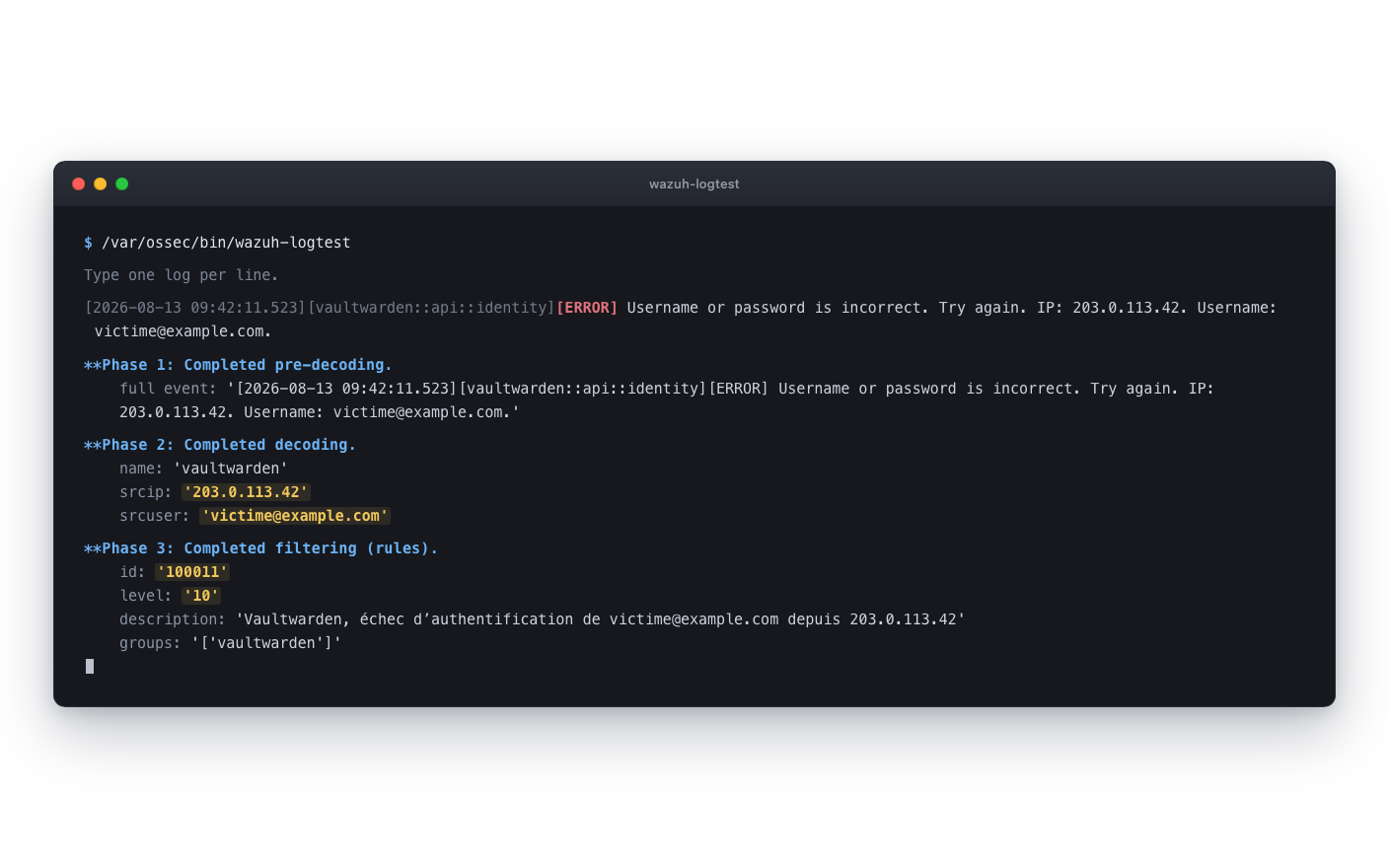
You launch it, it invites you to paste a log line, and it replays before your eyes the three phases we talked about, pre-decoding, decoding, matching. Decoding is your checkpoint, that’s where you verify a field you want to query actually exists. Matching tells you which rule wins, its identifier, its level, its description.
That console is your test bench. You can paste a log there, see that no rule picks it up, write your rule, paste the log again, and watch phase 3 change. Without ever touching production.
A full end-to-end example
Enough theory. Let’s take a real question, the most mundane one there is, and run it all the way through.
The question. “I want to know when someone fails to authenticate against my Vaultwarden vault, and from which address they’re trying.” One question, one service, one event. Someone fat-fingering the password of your password manager is exactly the kind of noise you want to hear.
The log in front of you. On every failure, Vaultwarden writes this line.
[2026-08-13 09:42:11.523][vaultwarden::api::identity][ERROR] Username or password is incorrect. Try again. IP: 203.0.113.42. Username: [email protected].Look at the format, it’s not classic syslog, no machine program[pid]. Vaultwarden prefixes each line with [timestamp][module][level]. Remember that, it’ll matter for the decoder.
The first reflex, the wide mesh. You could write a rule that digs through the raw text.
<group name="vaultwarden,">
  <rule id="100010" level="5">
    <match>Username or password is incorrect. Try again</match>
    <description>Vaultwarden, authentication failure</description>
  </rule>
</group>
It works, it sounds on every failure. But all you get is a bare fact, “someone got it wrong”. The address and the targeted account are right there, in the line, except Wazuh doesn’t see them as fields. No way to count attempts per address, to geolocate, to spot the persistent one coming back every ten seconds. You’ve opened a tap, not asked a question.
The right mesh, the tweezers. Start over. To query the address and the account, you need those fields decoded. And Vaultwarden isn’t one of the formats Wazuh knows out of the box, you’ll have to teach it, the next section covers the decoder. Let’s assume it already extracts srcip and srcuser. Your rule then becomes surgical.
<group name="vaultwarden,">
  <rule id="100010" level="0">
    <decoded_as>vaultwarden</decoded_as>
    <description>Vaultwarden, recognized line, detection base</description>
  </rule>

  <rule id="100011" level="10">
    <if_sid>100010</if_sid>
    <match>Username or password is incorrect</match>
    <description>Vaultwarden, authentication failure for $(srcuser) from $(srcip)</description>
  </rule>
</group>
Look at what’s happening there. Rule 100010 is at level="0", it doesn’t sound, it just serves as a base, it says “this line comes from Vaultwarden”. Rule 100011 latches onto it via <if_sid>, only fires on the authentication failure, and recalls in its description the targeted account and the address the attempt came from. One question asked, one answer given, and total silence on everything else. And if tomorrow you only want an alert for one specific account, you swap this <match> for a <field name="srcuser">[email protected]</field>, and the tweezers tighten further. The day you want to scream when the same address fails ten times in a minute, you’ll layer frequency and timeframe on top, but that’s another rule for another day.
The test, before deploying anything at all.
/var/ossec/bin/wazuh-logtestPaste your log line. In phase 3, you should see rule 100011 sound, at level 10, with your description filled in: Vaultwarden, authentication failure for [email protected] from 203.0.113.42. The address is right there, recovered, ready to geolocate or correlate. If you want to validate in a single command, without reading the output, the -U option compares the result to an expected triplet, identifier, level, decoder, and hands you back a clean exit code.
/var/ossec/bin/wazuh-logtest -U 100011:10:vaultwardenThen you reload.
sudo systemctl restart wazuh-managerA restart briefly cuts log reception, the time the service takes to come back. On an SMB manager, it’s painless.
The 100010/100011 example shows the exact
if_sidchaining, with the decoded fields fed back into the description. Before counting on the alert in production, paste it intowazuh-logtestand check that the$(srcip)and$(srcuser)substitutions show up. Thirty seconds, and no typo discovered the day the alert mattered.
When you need a decoder, and when you really don’t
It’s the eager beginner’s trap, writing a decoder for everything. Don’t do it.
The principle is simple. If an existing decoder already outputs the field you care about, you write no decoder. You write a rule directly that latches onto the existing rule and compares the field. Most standard formats, those of SSH, of system services, of well-known servers, are already decoded by Wazuh. Check it first in phase 2 of wazuh-logtest, if your field shows up, the work is done.
You write a decoder only in one precise case, when Wazuh doesn’t understand the format of an in-house or exotic log. Phase 2 of the test stays empty or doesn’t output the field you’re after? Then, and only then, you teach Wazuh to read that format.
A custom decoder lives in /var/ossec/etc/decoders/local_decoder.xml, and it’s made of two blocks, a parent that recognizes the application, a child that extracts the fields. For our Vaultwarden, that gives:
<decoder name="vaultwarden">
  <prematch>][vaultwarden::</prematch>
</decoder>

<decoder name="vaultwarden">
  <parent>vaultwarden</parent>
  <regex>IP: (\d+.\d+.\d+.\d+). Username: (\S+).</regex>
  <order>srcip, srcuser</order>
</decoder>
The parent recognizes the line by a stable substring, ][vaultwarden::, the module name Vaultwarden stamps onto every one of its lines. Why not a <program_name> like usual? Because Vaultwarden doesn’t write in syslog, there’s no program field to latch onto. If you pipe your logs through journald or syslog upstream, the standard prefix comes back and you can return to the classic <program_name>vaultwarden</program_name>. Reading the file or the Docker output directly, the <prematch> on the module is your sturdiest grip. The child, meanwhile, captures the address then the account, in that order, and names them srcip and srcuser, exactly the fields your rule 100011 expects. The name srcip is no whim, it’s the one Wazuh knows how to geolocate and correlate. The loop is closed.
A warning on regular expressions, because that’s where you lose hours. Wazuh’s pattern syntax isn’t quite the classic regex you’re thinking of, the default engine (OS_Regex) has its own conventions. Test every decoder in wazuh-logtest before trusting it, and treat the example above as a template to validate on your real format, not as guaranteed copy-paste.
The real danger isn’t the syntax, it’s the number
You now know how to write a rule. The technical part is behind you. What’s left is the part that kills SIEMs, restraint.
Every rule you add is one more mouth that will speak. And the reflex, once you know how to write, is to write too much, a rule for this, one for that, just in case. Three weeks later, your feed looks like the indistinct wall episode 1 pulled you out of, except this time, you’re the one who built it.
Hence the only hygiene rule that counts, the same as in the first episode.
Never create a rule you don’t know what to do with when it sounds. If your only possible reaction to the alert is a shrug, that rule has no reason to exist.
level is your dosing tool, it runs from 0 to 15, the 16 exists but stays undocumented. Use it seriously.
- The 0 is silent. It decodes and observes without ever waking anyone. It’s the level of base rules, like the 100010 in the example. Perfectly legitimate, and underused.
- The low levels, 2 to 7, are the background noise, minor errors, harmless attempts.
- The middle, 8 to 11, deserves an eye.
- The high end, 12 to 14, these are the important security events.
- The 15 is the severe attack, the one that calls for immediate reaction, no false positive expected.
Don’t invent a meaning for the 16, undocumented. And above all, don’t slap a high level on a rule out of zeal. A high level only makes sense if a concrete action is planned when it drops. Otherwise, you’re manufacturing anxiety, not security.
If it doesn’t work
Problem, your rule never fires in the test
Likely cause, the field you’re querying isn’t decoded, or the parent rule referenced in <if_sid> doesn’t match this log.
Solution, rerun wazuh-logtest with the verbose option -v and read phase 2. If your field doesn’t show up there, no decoder produces it, so you need to write one before writing your rule. Also check that the identifier in <if_sid> really matches a rule that does pick up the log.
Problem, wazuh-logtest sees your rule but the manager ignores it in production
Likely cause, the service hasn’t been reloaded since you modified the file.
Solution, sudo systemctl restart wazuh-manager. The test tool reads your files directly, the production engine, meanwhile, works on the ruleset loaded in memory. Until you reload, it doesn’t know your new rule.
Problem, your rule disappeared after a Wazuh update
Likely cause, you’d written it in /var/ossec/ruleset/ instead of /var/ossec/etc/rules/.
Solution, rewrite it in local_rules.xml and never set foot in ruleset/ again. That directory is Wazuh’s turf, rewritten at every version bump.
For the impatient
What this article does. It teaches you to write your first Wazuh detection rule, starting from a real log and a precise question, to test it out of production, then to deploy it without breaking anything.
Concretely, the steps to follow.
- Grab the raw log you care about and run
/var/ossec/bin/wazuh-logtestto see which fields Wazuh already extracts from it. - Write your rule in
/var/ossec/etc/rules/local_rules.xml, identifier between 100000 and 120000, never inruleset/. - Favor precision, latch onto an existing rule with
<if_sid>and compare a decoded field with<field>, rather than digging through raw text with<match>. - If the field you want isn’t decoded, and only in that case, write a decoder in
/var/ossec/etc/decoders/local_decoder.xml. - Test in
wazuh-logtestuntil green, if needed with-U identifier:level:decoderfor a one-command validation. - Reload,
sudo systemctl restart wazuh-manager. - Golden rule, never write a rule you don’t know what to do with when it sounds. The
level0, to observe without alerting, is your friend.
In short
You went from reader to author. You no longer put up with rules written by others, you ask your own questions to your own logs.
And the lesson isn’t in the XML syntax, which you’ll master in three rules. It’s in the restraint. A good rule targets a precise log, chains onto what already exists, and stays silent on the rest. The decoder, you only write it when forced. The level, you set it honestly. And every rule you add, you earn it with an action you’re ready to take when it sounds.
Pick few questions. Answer them for real. It holds for reading, it holds for writing.
To dig deeper, the official docs
Every bit of syntax you just handled is documented, page by page. Keep these links within reach, they’re your sources.
- Rule options reference:
id,level,if_sid,field,match,regex, and the advanced optionsfrequencyandtimeframe. - Custom rules and
overwrite, where and how to write inlocal_rules.xml. - Decoder syntax:
prematch,parent,regex,order, and custom decoders. - Wazuh regular expressions, so you don’t mix up OS_Regex and PCRE2.
- Rule level classification, from 0 to 15.
wazuh-logtest, the testing tool, options-vand-U.
What’s next, show your SIEM what you block
You know how to read your SIEM, you now know how to teach it new questions. The next step is to give it something it doesn’t yet catch to look at, what your Macs let run, and above all what they refuse.
Next episode, we wire the execution control of your Macs into Wazuh, so that every block becomes a readable alert in the same dashboard as the rest. The writing move you just learned will be your basic tool there.
Coming soon: Wiring Santa into Wazuh, correlating what runs and what gets blocked
And for the episode before it, the one where you learn to read before you write.
Read: Your sovereign SIEM, learn to read it properly then make it act
Technical terms? Check the glossary.