The DNS, your digital Achilles heel.
You encrypt your emails, pay for a VPN, enable Tailscale. Yet your ISP knows you visited Tinder.com last night. DNS, that's why.
The Paradox of Half-Sovereignty
September 2026 Update. Mullvad is shutting down its public encrypted DNS servers on 2 November 2026 and funding the Quad9 Foundation instead. If you installed the Mullvad profile from level 1, switch to Quad9 before the deadline, Mullvad VPN clients are unaffected, their DNS stays inside the tunnel.
You’ve paid for a serious VPN. You’ve migrated to Proton Mail. You’ve set up a mesh Tailscale between your Macs. You’ve turned on iCloud’s Advanced Data Protection, disabled half the analytics, switched Safari to privacy max.
Yet your ISP still knows that last night, at 11:47 PM, you opened a tab on a dating site.
Not because your VPN leaked. Not because Apple cracked. Because the most basic layer of the internet, the one everyone’s heard of but no one pays attention to, operates in plaintext by default. This layer is called DNS, and it’s the weak link no one notices, even in otherwise solid privacy stacks.
This article explains why this link is broken, why easy answers like Cloudflare’s 1.1.1.1 and iCloud Private Relay aren’t really answers, and how to regain control in three graduated levels.
What’s DNS?
The directory that makes the internet usable
Humans remember names: proton.me, apple.com, macsouverain.fr. Machines, however, only speak in IP addresses: 185.70.43.10, 17.253.144.10, 83.228.215.109. Between the two, we need a real-time translator. That’s DNS, the Domain Name System.
Imagine a landline phone without a directory. You know the name of your plumber but not their number. So, you first call directory assistance, get the number, then call your plumber back. DNS is exactly like that: an automatic directory assistance service, queried dozens of times per minute, without you even realizing it.
The full flow of a resolution
When you type signal.org into Safari, here’s what happens in a few dozen milliseconds:
- Your Mac checks its local cache. Has it asked for this address recently? If yes, it reuses it and that’s it.
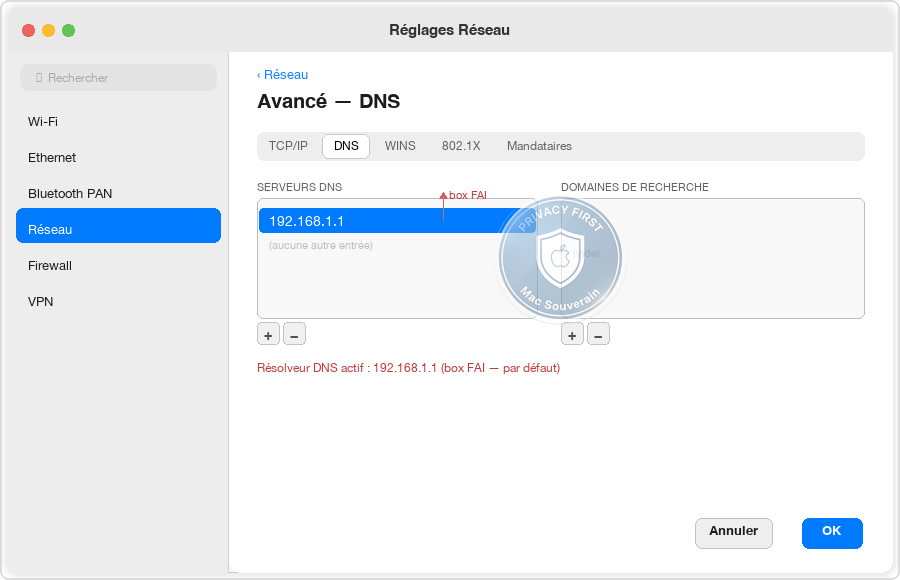
- Otherwise, it queries the resolver configured on the machine. By default, that’s the one your router pushed via DHCP, so your ISP’s.
- If the resolver doesn’t have the answer in cache, it hits the DNS hierarchy. It first queries a root server, one of the thirteen reference addresses of the global directory (deployed on hundreds of physical instances in anycast), which tells it “for
.org, ask these servers”. - It then queries the TLD server for
.org, which tells it “forsignal.org, ask these servers”. - It finally queries the authoritative server for
signal.org, which holds the official truth and sends back the IP address. - The resolver sends you the response, your Mac can establish the HTTPS connection.
This descent of the hierarchy is called recursive resolution. The resolver does the climbing for you.
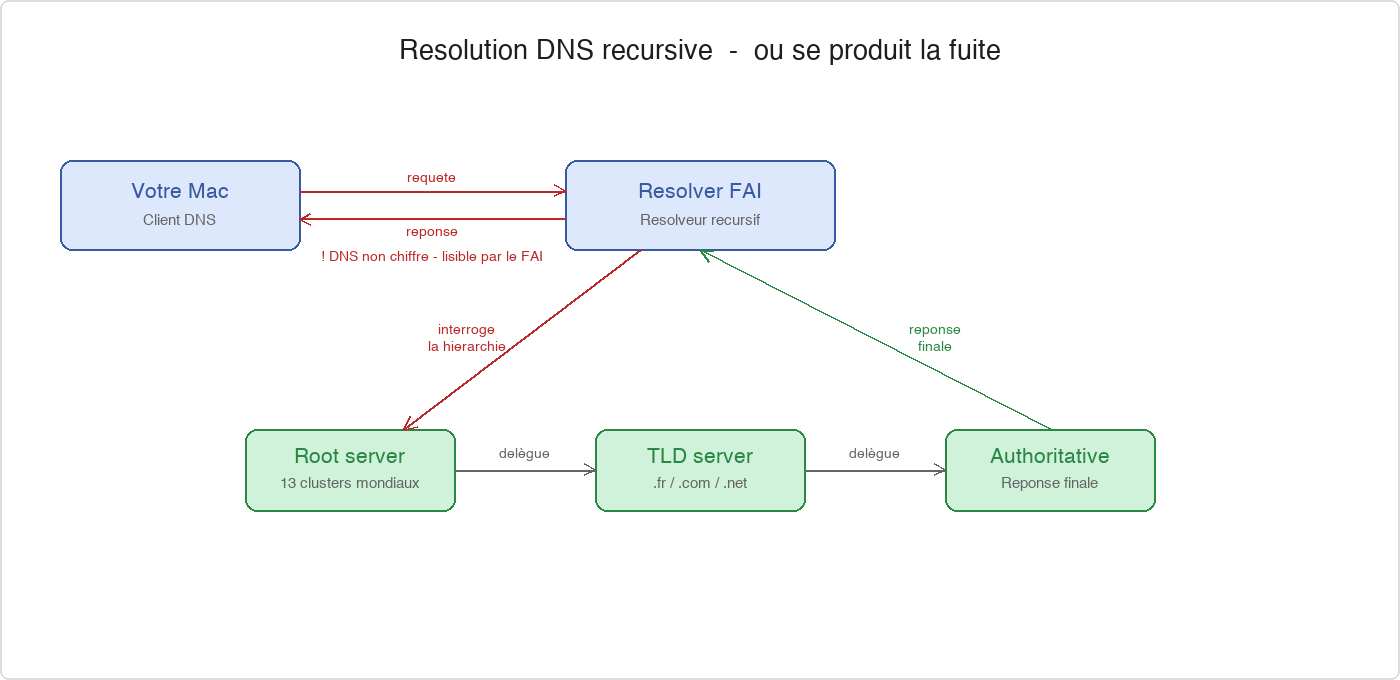
And it’s precisely on this first link, between your Mac and the resolver, that everything hangs.
Why It’s Achilles’ Heel
By default, everything goes in the clear
Classic DNS runs on port 53, using UDP, without encryption. When your Mac asks your ISP for proton.me, the question and answer travel in the clear over the network, readable by any equipment between the two: your modem, the neighborhood DSLAM, the operator’s router, and of course, the ISP’s own DNS server doing the work.
HTTPS doesn’t change that. It encrypts the content of pages, not the DNS query that preceded them. Your ISP already noted the destination before the encrypted connection starts. You can have the best lock icon in the world on Safari, your ISP already knows where you’re going.
Your ISP sees every domain, with timestamps
It’s like knowing every store you visit in a day without knowing what you’re buying. For commercial profiling or judicial scrutiny, that’s more than enough.
A visit to a divorce lawyer’s website speaks volumes. So does a 3 AM visit to a betting platform. Same goes for a morning visit to a specialized medical site. Your browsing data is a goldmine of free data, to sell or exploit.
In France, ISPs are legally required to keep these metadata for a year (decree 2006-358, challenged but maintained despite CJEU rulings). In the US, ISPs have sold browsing histories to data brokers, legally, due to lack of federal protection. The risk isn’t targeted spying in everyday life, it’s structural exposure: data collected automatically, stored for months, accessible on request or via a leak.
Encrypted at ISP ≠ Encrypted End-to-End
Many users think that because their router shows a lock icon in the admin interface or their plan mentions “secure DNS”, they’re protected. Wrong. Your ISP could very well encrypt the link between its own servers and an upstream, but that doesn’t change anything: it’s them who resolve, it’s them who see, it’s them who log.
The only way to keep your DNS query away from your ISP is if it never goes through their servers. Not through them, not through their box, not through their “enhanced” resolver.
And even with a VPN, it can leak
You’ve got a VPN running. All your traffic is encrypted in a WireGuard tunnel. Yet, your DNS queries can bypass the tunnel and go straight to your ISP. That’s a DNS leak, one of the quietest flaws of poorly configured or cheap VPNs.
The mechanism is simple: your device remembers the DHCP resolver of the modem, the VPN doesn’t push its own resolver hard enough, and some system queries go parallel to the tunnel. Your web traffic is protected, your DNS is exposed.
Thirty-second test: dnsleaktest.com or dnscheck.tools. If your ISP appears in the list while your VPN is connected, you’re leaking.
The DoH, DoT, and Private Relay Trap
Encrypting, yes, but with whom
To answer clear-text DNS, the industry has pushed two protocols: DoH (DNS-over-HTTPS, port 443) and DoT (DNS-over-TLS, port 853). In essence, they do the same thing: encapsulate the DNS query in an encrypted tunnel between your Mac and a resolver. But DoH blends in with normal HTTPS traffic and is harder to identify and block by network admins, while DoT is easier to spot.
Enabling DoH or DoT finally gets your DNS queries out of your ISP’s sight. It’s a real improvement. But we haven’t really solved the problem; we’ve just moved it.
Because the real question isn’t “Is it encrypted on the wire?” It’s “Who’s on the other end?”
Centralization, the other name for snooping
When you enable DoH by default on Chrome, Firefox, or via a generic macOS profile, you typically end up with Cloudflare, Google, or NextDNS. Cloudflare handles a huge chunk of global public DNS. So does Google. Both are American companies, subject to the CLOUD Act, meaning they can be forced by US justice to hand over data, regardless of the user’s nationality.
You’ve replaced one snoop, your ISP, which can be compelled by French justice, with another, an American cloud service that can be forced by the US, no warrant needed, thanks to the 2018 CLOUD Act. The conversation isn’t in clear text on the wire; it’s just recorded elsewhere.
This is where most DNS comparison guides look away. “Cloudflare 1.1.1.1 is free and it’s fast.” That’s true. “It’s private” is a claim that can be misleading and needs to be contextualized by the jurisdiction and business model of the operator.
Apple Private Relay, the premium illusion
iCloud Private Relay, included with iCloud+, is an interesting twist on the same trap. The mechanism: Apple encrypts your DNS queries and Safari traffic, sends them first to an Apple server, then to a partner (Cloudflare or Fastly in most regions). The idea is that no single actor sees both who you are and where you’re going.
On paper, it’s elegant. In practice, two major issues.
First, Private Relay closes DNS at the OS level, for Safari and certain system apps, bypassing what you’ve configured. You thought you were using Quad9? Apple goes through Cloudflare or Fastly for Safari, without asking.
Second, it only covers Safari and a fraction of iCloud traffic. Your Chrome, Firefox, Mail, Slack, Discord, SSH client, terminal, torrent client, third-party apps: Private Relay doesn’t touch their DNS queries.
You’re paying for a “premium” service for partial coverage that shifts trust to an Apple+Cloudflare duo you can’t configure or replace. Apple sees you browsing, Cloudflare sees where you’re going, separately by design, but still two CLOUD Act actors you have no control over. For half the traffic, you’ve gained nothing.
What It Changes in Practice
What Your ISP Sees, and Doesn’t See
Without encrypted DNS, your ISP has a complete log: domain, timestamp, frequency, approximate session duration. They can deduce that you visit a banking site every day at 8 AM, that you check a specific medical site every Tuesday evening, that you spend time on alternative news sites, that you connect to signal.org at certain times. They don’t read your messages; they don’t need to.
With encrypted DNS and a trustworthy resolver, your ISP only sees TLS connections to IP addresses. They know you’re using the internet, not whom you’re connecting to first. Some IP addresses are still revealing, but it’s a huge qualitative leap from the default.
What Can Still Be Correlated
Let’s be clear about what’s still exposed even with sovereign DNS.
Server Name Indication (SNI): During the TLS handshake, your browser still announces in plaintext which domain it wants to connect to, so the server can present the correct certificate. This information is readable by network actors, regardless of DNS. The solution is Encrypted Client Hello (ECH). Major browsers support ECH on the client side, but server deployment is lagging. For sites without ECH on the server side, SNI remains readable by network actors.
Destination IP Address: Even if no one reads your DNS and SNI, connecting to a server reveals its IP address. For a service using a large shared CDN (Cloudflare, AWS), the IP address alone doesn’t say much. For a small self-hosted site, the IP address is enough to identify it.
Browser Fingerprinting: This is where it gets more concrete. Your browser passively divulges, when loading any page, a combination of signals: canvas rendering, GPU, installed fonts, screen resolution, time zone, active plugins. Together, they form a unique enough fingerprint to identify you across sites, without cookies, without visible identifiers.
This is the post-cookie tracking technique used by adtech networks and data brokers, Meta Pixel, Google Analytics, and dozens of less visible actors. It works in private browsing. It survives cookie deletion. And it has nothing to do with your DNS resolver: you can use Quad9 encrypted, your browser fingerprint remains readable.
Sovereign DNS is not a magic wand. It’s one layer of protection among others. It plugs the most visible, most systematic, and least noticed gap.
Myths to Debunk
« I have a VPN, so DNS is covered »
Not necessarily. A serious VPN pushes its own DNS resolver and forces all queries through the tunnel. A free or cheap VPN doesn’t do this, or does it poorly. And even with a serious VPN, certain macOS configurations, apps that resolve through their own stack, DHCP fallbacks, can bypass it. Mandatory test at dnscheck.tools.
« DoH equals privacy »
DoH encrypts the pipe. It doesn’t change the nature of the operator on the other end. Enabling DoH by default in Chrome typically means sending your DNS to Cloudflare or Google. Centralization and US jurisdiction are separate issues from encryption, and they don’t disappear with a lock added on top.
« I have nothing to hide »
The classic argument rests on a false assumption: that the problem is what you do. The real problem is what others can do with your data. Several months’ worth of DNS history, cross-referenced with third-party databases, paints a behavioral profile that you don’t control the usage, retention period, or future recipients of. “Nothing to hide” assumes you know all the ways this data could be reused against you. No one does.
« Apple Private Relay is great»
On a subset of Safari traffic, Private Relay improves the status quo. On the rest, it does nothing. And it shifts trust towards Apple + Cloudflare/Fastly with no configurable alternatives. For someone who doesn’t want to touch settings, it’s better than nothing. For someone trying to have a cohesive sovereign stack, it’s a placebo that could give a false sense of security.
« Cloudflare 1.1.1.1 is fast and free»
True. It’s also an American cloud whose business model relies on aggregated network data collection, and it’s subject to the CLOUD Act. For an ordinary user, it’s better than the router’s DNS. For someone wanting to get out of Five Eyes jurisdictions on their privacy stack, it’s a starting point, not the destination.
Take Back Control, at Three Levels
Three levels of engagement, from simplest to most sovereign. Each is a genuine improvement. Choose the one that fits your available time and technical tolerance threshold.
Level 1, Instant Gain, Two Minutes
Switch your macOS system resolver to a respectful operator, using DoH or DoT, via a configuration profile. No app to install, no service to launch.
Concrete Steps:
- Choose a resolver. Two serious candidates, accessible without special technical knowledge: Quad9 (non-profit foundation, Switzerland, NLPD jurisdiction) and Mullvad DNS (Sweden, declared no-logs, Cure53 audited infrastructure, transparent operator). Both: a
.mobileconfigfile, two clicks, done. - Get the official
.mobileconfigprofile fromquad9.netormullvad.net, depending on your choice. - Double-click the file on your Mac, go to System Preferences > Privacy & Security > Profiles, validate the installation.
- Check the result on
dnscheck.tools: you should see the chosen resolver, plus your ISP.
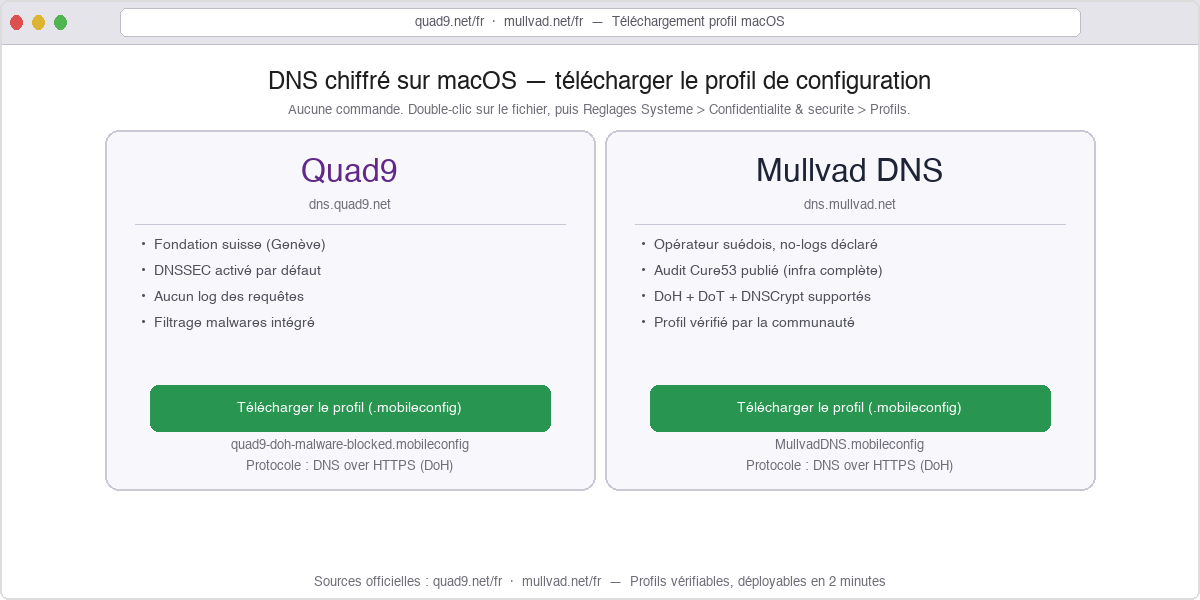
Advantage: Two minutes, zero maintenance, instant gain. Your queries are no longer visible to your ISP.
Limit: You’re still entrusting your queries to an external operator. Quad9 and Mullvad have verified no-log policies and independent audits, which is far better than your ISP. But they’re a foundation or a company, not you. For those who want to delegate less, we step up a notch.
Level 2, Local-First with dnscrypt-proxy
Install dnscrypt-proxy on your Mac. It’s a local service that becomes your resolver. It handles DoH, DoT, DNSCrypt protocol, local caching, domain filtering, and especially anti-leak: it intercepts all system queries and forces them into its encrypted tunnel, regardless of what macOS would have done by default.
How it works:
Your Mac requests proton.me. The query goes to 127.0.0.1:53, to dnscrypt-proxy running locally. The proxy encrypts the query and sends it to one or more anycast resolvers (Quad9, Mullvad, community DNSCrypt servers). The responses come back, are cached locally, and serve your Mac. The whole process happens without your ISP seeing anything, and with the option to wake up multiple upstreams to avoid putting all your eggs in one basket.
Concrete Steps:
- Installation:
brew install dnscrypt-proxy. - Configuration: Edit
/opt/homebrew/etc/dnscrypt-proxy.tomlto enable DoH, disable clear DNS, choose a list of resolvers (Quad9, Mullvad, non-logging community ones). - Startup:
sudo brew services start dnscrypt-proxy. The service registers and starts on boot. - Configure macOS to use
127.0.0.1as the only resolver (System Preferences > Network > Advanced > DNS). - Check on
dnscheck.tools: you’ll see multiple upstreams running, never your ISP, never Cloudflare or Google.
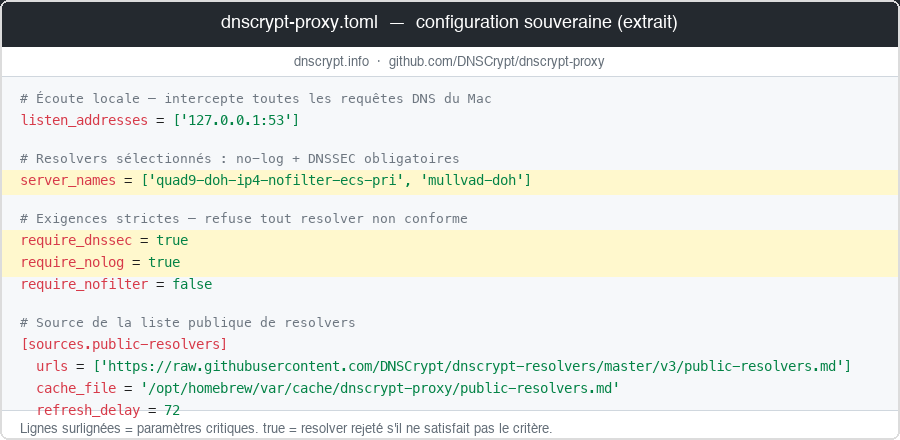
Advantage: 80% sovereign. Your Mac no longer trusts a single operator. You can distribute the load across multiple no-log European resolvers. Built-in anti-leak. Fast local cache.
Limit: One level higher in initial config, about thirty minutes the first time. Minimal maintenance afterwards, updates via brew. You’re still trusting external resolvers, just multiple ones instead of one, and with the ability to change them in two lines of config.
Level 3, Full Control, Recursive Unbound on Personal VPS
Set up your own recursive resolver. No third parties at all. Your Mac queries your machine, which descends the root → TLD → authoritative hierarchy all by itself. No one facing sees the aggregate of your queries: each authoritative server only sees the query that concerns it, with no knowledge of the rest.
How it works:
You have a VPS at a sovereign hoster (Infomaniak in Switzerland, Hetzner in Germany, etc.). On this VPS runs Unbound, an open-source recursive DNS server renowned for the cleanliness of its code. You connect your Mac to this VPS via Tailscale, so through a WireGuard-encrypted tunnel on a private network. You configure your Mac to use the Tailscale IP of the VPS as the resolver. The queries are encrypted in Tailscale, land on Unbound which does the recursive resolution, and come back. And because all your traffic goes through the Tailscale WireGuard tunnel, your ISP only sees encrypted packets going to Tailscale endpoints.
No commercial operator logs the entirety of your queries. The authoritative servers see a European datacenter IP, not your residential IP. The only residual link in the base config: the recursive queries of Unbound leave the VPS in unencrypted UDP. To eliminate this, configure Unbound in forward-tls-upstream mode to Quad9 or Mullvad in DoT (port 853), and the whole path becomes encrypted, your hoster sees nothing more.
Concrete Steps:
- Provision a small VPS (1 vCPU, 1 Go RAM, more than sufficient) at a sovereign hoster.
- Install Unbound + DNSSEC validation enabled.
- Join the VPS to the Tailscale mesh.
- Restrict Unbound to only listen on the Tailscale interface, never the public one.
- Configure macOS to use the Tailscale IP of the VPS as the only resolver.
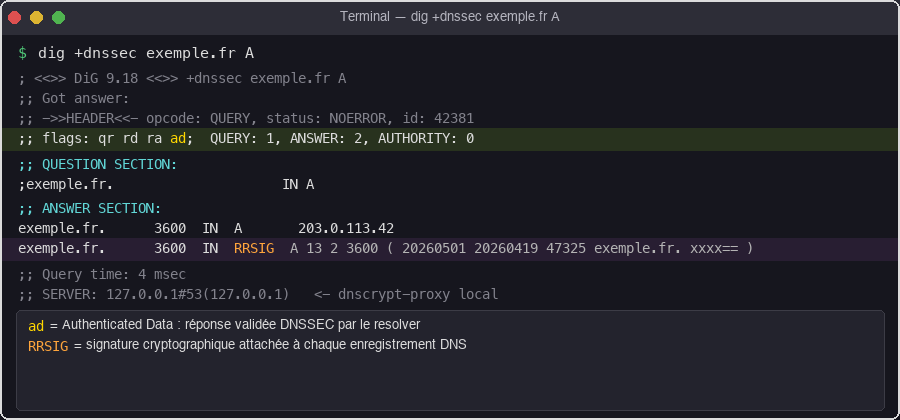
Advantage: Maximum sovereignty over DNS. No third-party operators. End-to-end DNSSEC validation. You can add your own filtering lists (advertising, trackers, Apple telemetry, Microsoft telemetry) without relying on an external service. The resolver is yours.
Limit: The barrier is the installation. Count on half a day the first time if you’ve never touched Unbound. Once set up, maintenance is minimal, monthly package update and occasional logs. You pay for a VPS, a few euros per month.
Overkill for most individuals, but consistent when the rest of the stack is already sovereign (mail, drive, password manager, mesh) and the DNS would otherwise remain the last centralized link.
What’s Still Exposed, and How to Close It
Sovereign DNS closes the most systematic gap. Three others remain.
Server Name Indication (SNI): During the TLS handshake, your browser announces the destination domain in plaintext. Even with perfect DNS, this info remains readable by network actors, until ECH is deployed server-side.
The destination IP address remains visible. For services behind a shared CDN, the IP alone doesn’t reveal much. For a self-hosted site on a dedicated VPS, it’s enough for identification.
Browser fingerprinting: Canvas, GPU, fonts, timezone create a cross-site fingerprint that adtech uses independently of DNS, and it survives private browsing. Neither sovereign DNS nor Tailscale affects this: it’s an application layer issue, in the browser. The solution lies in Firefox with arkenfox, Brave with its native randomization, or extensions like CanvasBlocker. A separate topic, article coming soon.
The fix for SNI and IP: Tailscale with exit node. All your traffic goes through a encrypted WireGuard tunnel. Your ISP no longer sees DNS queries, SNI, or the destination. Sovereign DNS + Tailscale exit node, that’s the combo closing these two doors at once.
Sovereign DNS alone is the first brick. Sovereign DNS + Tailscale exit node, that’s the truly locked-down network stack. Tailscale’s architecture is the follow-up, and we promise to explain it all in detail in an upcoming article soon.
In summary
DNS is the internet’s phone book. By default on most connections, it works in plaintext, and your ISP sees every domain you visit, timestamped. HTTPS doesn’t change that; it encrypts content, not destination. And a poorly configured VPN can leak DNS outside the tunnel without you realizing.
Easy solutions are just problem shuffling. Enabling DoH by default typically means switching to Cloudflare or Google, American clouds subject to the CLOUD Act. iCloud Private Relay covers Safari and forgets the rest, giving keys back to Apple and Cloudflare for the part it covers. You haven’t removed the snoop, you’ve just swapped it.
Taking control happens in three graduated levels: immediate gain with Quad9 or Mullvad DNS in DoH, two minutes via config profile. Local-first with dnscrypt-proxy on your Mac, native anti-leak, multi-resolvers, in thirty minutes. Full control with Unbound recursive on a personal VPS via your Tailscale mesh, exit node enabled, half-day install, DNS and SNI sorted at once.
Concrete steps:
- Test your DNS leaks now at
dnscheck.tools. If your ISP or Cloudflare show up and it wasn’t a conscious choice, you know what to do. - Choose an honest level of engagement with your time. Level 1 immediate is better than Level 3 never.
- If you already have a privacy stack elsewhere (VPN, Proton, Tailscale), ensure DNS isn’t the weak link revealing what the rest protects.
DNS is the first brick in a coherent network sovereignty. Without it, the rest is partly theater. With it and Tailscale as exit node, it’s a stack truly armored.
Also see
- Why you need a VPN, and what it actually does
- Digital sovereignty in practice
- The cloud, it’s someone else’s computer
- macOS privacy, settings to change immediately
Need tech terms explained? Check the glossary.