Santa in Wazuh, from noise to an alert that speaks
A lone Santa block is noise. Correlated in Wazuh, it's a detection. Teach your SIEM to decode then aggregate Santa events.

Last episode, you learned to write your own Wazuh rules, starting from a real log and a precise question. Today, you apply that move to a source your Macs already produce, Santa.
Because you laid the basic plumbing back in the Santa episode. Your Macs learned to send every block into Wazuh, and a refused binary shows up on your dashboard, next to your mail rejections and your network blocks. Except what you wired up there was the pipe, not the intelligence. Each block arrives alone, at the same level, with nothing tying it to the next one. And a block on its own doesn’t prove much.
That’s exactly today’s topic. A lone Santa block is noise. Correlated in Wazuh, it’s a detection. We’ll teach your SIEM to decode these events cleanly, to tell a real lock from a mere heads-up, then to aggregate them, so a burst of refusals or a block followed by another signal becomes a named incident, not five scattered alerts.
This tutorial targets the same branch as the whole series, reference version 4.14.7. Set aside a short hour, shell access to the manager, and a Mac running Santa that spits out real lines.
Read first: Wazuh, write the rule that catches what you’re really after, and for reading before writing, Your sovereign SIEM, really read it then put it to work.
What you need
Nothing new to install. Everything is inherited from the previous episodes.
- Santa in Lockdown on at least one Mac, logging to
/var/db/santa/santa.log. That’s the takeaway from the Santa episode, we’re not redoing it. - The Wazuh agent on those Macs, the one already reading that log and shipping it to the manager.
- Shell access to the manager, your series VPS. Decoders and rules live in files, on that machine and that machine only.
- Real block lines in front of you. As with any rule, you don’t guess a format, you read it. Trigger a
DENYby launching a binary you haven’t allowlisted, and keep the line handy.
This requirement is no side note. Writing a correlation rule without seeing the real events it’s meant to link is guessing twice.
What changes, what doesn’t
What changes. By the end, you no longer get five identical, mute alerts when the same binary bangs on the door five times. You get a single, higher alert that tells you which one, how many times, and on which machine. The block stops being one more line, it becomes a qualified fact.
What doesn’t change. You watch and you qualify, you still cut nothing. Banning an address, killing a process, dropping a session in reaction to the alert, that’s another floor, and we keep it switched off today, exactly as in the series’ first episode. Here, we teach your SIEM to understand what it sees, not yet to act on its own.
A lone block proves nothing
Let’s start from what you wired up in the Santa episode. A rule that fires at level 10 as soon as a line carries decision=DENY. It served you well, it showed you the feed worked. But it has two blind spots, and they’re what turns a good tool into an anxiety machine.
First blind spot, it doesn’t tell the mode apart. Remember the progression from the Santa episode, you start in Monitor to map, then you flip to Lockdown. Those two modes don’t tell the same story. In Lockdown, a DENY is a binary that was stopped from running. In Monitor, Santa lets everything through and logs ALLOW, with the reason alone telling you it would have blocked in Lockdown. Treating both at the same level means screaming over executions that actually happened, and drowning throughout the rollout phase.
Second blind spot, it treats each block as a final event. A lone DENY, most of the time, is a homegrown update helper relaunching itself, or a test binary run once and forgotten. A calibration false positive, not an attack. The signal isn’t in the block, it’s in the pattern. One attempt is a footnote. The same one, five times in a minute, is a modus operandi.
Decode, distinguish, correlate. That’s the plan for the four sections that follow.
Step 1, read Santa in plain text
To correlate, you need clean, named, typed fields. The binary’s path on one side, the mode on the other, the decision apart. The good news is Santa already gives you all of that, in plain text, in the format you laid down in the Santa episode.
That format is the file format, the one from the EventLogType key set to file. One line per execution, a timestamped prefix, then a run of key=value pairs stuck together with vertical bars. Here’s a block line, identifiers neutralized.
[2026-01-15T09:33:12.148Z] I santad: action=EXEC|decision=DENY|reason=BINARY|sha256=9f2c…|pid=42117|user=mack|mode=L|path=/usr/local/bin/updater|machineid=…It’s all there, flat. decision=DENY is the verdict. mode=L is Lockdown, the letter that says a binary was stopped, not just flagged. reason=BINARY is the rule that made the call. path= is the culprit. Short keys, short values, one line per event. This isn’t JSON, so Wazuh doesn’t unfold it on its own, you write it a small decoder that names the fields. In exchange, you get a stable format that won’t shift from one version to the next.
Santa can also write JSON, but that rendering is marked BETA and unstable, so we decode the file format that’s already in place and that the Wazuh agent already reads.
On the agent side, nothing to touch. The <localfile> block from the Santa episode already reads /var/db/santa/santa.log as syslog, pushed to all your Macs by the macos group’s shared configuration.
<localfile>
  <location>/var/db/santa/santa.log</location>
  <log_format>syslog</log_format>
</localfile>
It all happens on the manager side, in the decoder. In the Santa episode, you laid one down that already pulls out the decision, the reason and the path, in /var/ossec/etc/decoders/local_decoder.xml. We enrich it with a single field, the mode, because that’s the one that will arbitrate everything from here on.
<decoder name="santa">
  <prematch>santad: action=EXEC</prematch>
</decoder>

<decoder name="santa-decision">
  <parent>santa</parent>
  <regex type="pcre2">decision=(\w+)\|reason=(\w+)\|.*?\|mode=(\w+)\|path=([^|]+)</regex>
  <order>santa_decision,santa_reason,santa_mode,santa_path</order>
</decoder>
A word on that pattern, because there’s a trap you won’t see coming. In the args field, Santa rewrites every literal vertical bar as <pipe> and every line break as \n, precisely so an argument never breaks the splitting. As a result, your decoder has to anchor on known keys, decision=, mode=, path=, and never naively split on the last bar of the line. That’s why path=([^|]+) stops at the next bar, the one before args, instead of swallowing the rest. You extract the path, not the tail of the line.
Step 2, read the real field names
Here’s the reflex that saves you an evening. The file format is stable, but the order of the keys and above all their presence depend on your version of Santa and on what you run. A signed binary carries a teamid, a bare binary doesn’t. The format, you read it off a real line, you don’t recite it from memory.
The tool to read it is the one from the previous episode, wazuh-logtest. On the manager, you launch it, you paste a real line from your santa.log, and you look at phase 2.
sudo /var/ossec/bin/wazuh-logtestPhase 2 shows you each decoded field, with its exact name. That’s where, and nowhere else, you confirm that santa_decision, santa_mode and santa_path really come out of your line. If one of them is missing, it’s the decoder’s pattern you need to adjust, and you know it in thirty seconds. Never reload a rule set on the faith of a field you haven’t watched drop in phase 2.
Step 3, tell the real lock from a mere heads-up
Before counting, we name. Three base rules, in /var/ossec/etc/rules/local_rules.xml, on the manager. One umbrella rule that recognizes a Santa event, one for the real block, one for the Monitor heads-up we want to see without being woken up.
<group name="santa,">

  <rule id="100600" level="0">
    <decoded_as>santa</decoded_as>
    <description>Santa, decoded execution event.</description>
  </rule>

  <rule id="100601" level="10">
    <if_sid>100600</if_sid>
    <field name="santa_decision" type="pcre2">^DENY$</field>
    <field name="santa_mode" type="pcre2">^L$</field>
    <description>Santa, binary BLOCKED in Lockdown, $(santa_path).</description>
    <group>santa_block,</group>
  </rule>

  <rule id="100602" level="3">
    <if_sid>100600</if_sid>
    <field name="santa_decision" type="pcre2">^ALLOW$</field>
    <field name="santa_mode" type="pcre2">^M$</field>
    <field name="santa_reason" type="pcre2">^UNKNOWN$</field>
    <description>Santa, unauthorized binary tolerated in Monitor, $(santa_path).</description>
    <group>santa_monitor,</group>
  </rule>

</group>
Look at what’s happening. 100600 is at level 0, it decodes and stays quiet, it’s the base. 100601 only fires on the conjunction of a decision=DENY and a mode=L, the only case where a binary was actually stopped. 100602 catches the other face, a binary that nothing authorizes, reason=UNKNOWN, that ran anyway because we were in Monitor, mode=M on an ALLOW. It stays at level 3, a low trace you consult without it flooding you during the rollout, where everything goes through as ALLOW.
It’s the short letters of the file format that do the sorting, L against M, DENY against ALLOW. The anchoring ^L$ and not L, the same precaution as in the Santa episode, to match only the exact value and not some mode that starts with the same letter tomorrow.
The $(santa_path) in the description injects the real path into the alert. That’s the detail that makes a message actually talk, it tells you which binary, not just that there was one.
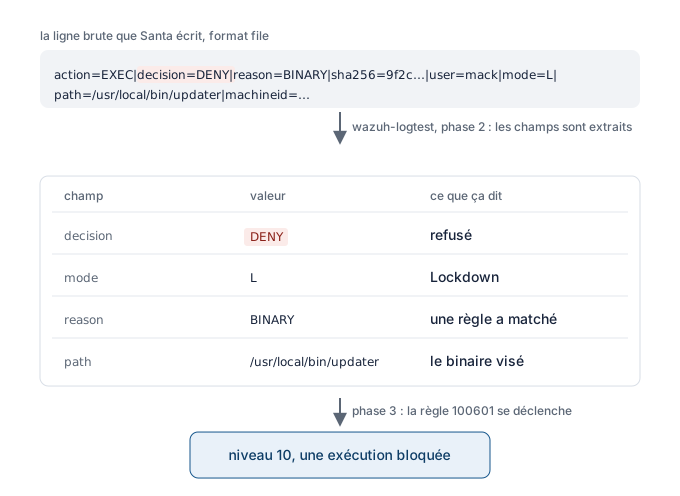
From raw log to verdict. wazuh-logtest unfolds the line, each field takes on its meaning, and 100601 raises the block at level 10.
These three rules replace the single rule from the Santa episode, the one that fired on every DENY. If you keep it on top, you count twice. Remove it, or drop its level to 0, and let these new ones take over.
Step 4, correlate, from lone block to incident
We’ve got our clean blocks. We can finally ask the two questions that turn noise into detection. Wazuh can do two things when it comes to correlation, two only, but well. We’ll take them one after the other.
Pattern A, the same binary that keeps trying
One block, fine. Five blocks of the same binary in a minute is a process that won’t quit, a script that keeps relaunching, a payload that won’t let go. We want a single, higher alert instead of the five.
<group name="santa,">

  <rule id="100610" level="12" frequency="5" timeframe="60">
    <if_matched_sid>100601</if_matched_sid>
    <same_field>santa_path</same_field>
    <description>Santa, 5 Lockdown blocks of the same binary in 60s, insistent process.</description>
    <group>santa_block,correlation,</group>
  </rule>

</group>
The mechanics are readable. if_matched_sid only looks at the real blocks, those from 100601. frequency sets the threshold at five, timeframe the window at sixty seconds. same_field restricts the count to a single executable path, santa_path, so you don’t add up five different binaries. Result, one level 12 alert instead of five scattered level 10 alerts.
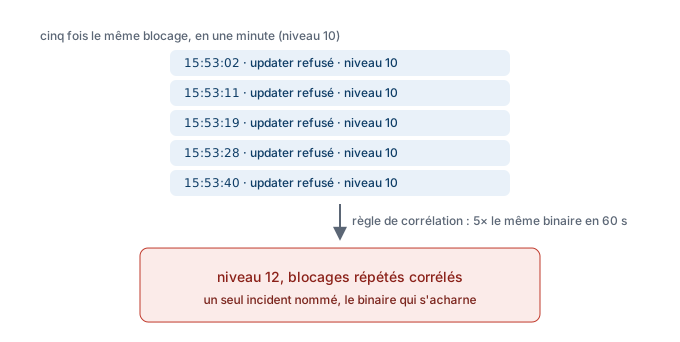
Five refusals of the same binary in a minute, a single higher alert. The count replaces the repetition.
If same_field plays tricks on your version, there’s a fallback that never lies, pin the binary in the rule. You add a <field> on the exact path, and by construction every counted event is the same binary, without depending on same_field. Less generic, but rock-solid for a first try.
<rule id="100611" level="12" frequency="5" timeframe="60">
  <if_matched_sid>100601</if_matched_sid>
  <field name="santa_path" type="pcre2">/Users/[^/]+/Downloads/updater$</field>
  <description>Santa, 5 Lockdown blocks of a specific binary in 60s.</description>
  <group>santa_block,correlation,</group>
</rule>
Pattern B, a block followed by another signal
The heart of the angle. Binary blocked plus some other source equals an incident. A refused executable on one machine can be harmless. A refused executable, then an unusual outbound connection from the same machine right after, that’s worth getting up for.
Since a network event shares neither the path nor the fingerprint of the Santa binary, the realistic common key is the host. And as it happens, Wazuh’s counting is already per agent by default, so grouping by machine is implicit.
<group name="santa,">

  <rule id="100620" level="12" timeframe="120">
    <if_matched_sid>100601</if_matched_sid>
    <if_sid>100300</if_sid>
    <description>Santa, binary blocked then outbound connection on the same host within 120s.</description>
    <group>santa_block,correlation,</group>
  </rule>

</group>
The rule fires on the network event (if_sid on 100300), provided a Santa Lockdown block (if_matched_sid on 100601) happened within the previous one hundred twenty seconds, on the same agent. The lone block becomes execution stopped, then a network attempt, a sequence that tells a story.
One caveat to know about that window. On Wazuh 4.14.7, an if_matched_sid with a timeframe but no frequency does not bound the window reliably, that’s a documented engine behavior, the rule can fire even when the precursor block is far older than your one hundred twenty seconds. And the intuitive fix, frequency="1", is refused at load. So treat 100620 as a sequence correlation, not as a strict guarantee on the window, and check its behavior yourself in wazuh-logtest, with an old precursor, before you count on it.
The limit, stated plainly
Wazuh correlates two cases well, the same rule N times in a window, and a recent rule followed by another, grouped by same_* or by host. What it doesn’t do natively is a free AND between arbitrary sources, along the lines of condition A from one source AND condition B from another, with no simple temporal relation. That’s a known and regularly requested limitation of the engine, not a flaw in your config.
The consequence is practical, not dramatic. You build your detections on the two patterns above, which are actually supported and robust, and you don’t try to write a boolean algebra the engine won’t hold. Two well-posed questions beat an overengineered contraption that never fires.
Step 5, test before you reload
We take none of these rules on trust. Before any restart, we validate in wazuh-logtest, on the manager.
sudo /var/ossec/bin/wazuh-logtestFor the base rules, you paste one line, you watch phase 3 announce 100601 at level 10 on a Lockdown block, with the binary path in the description. For the frequency rules, you have to send several lines of the same block in a row, in the same session, to see the threshold trip and 100610 fire at level 12. One line isn’t enough to prove a correlation, that’s the whole point. I never reload a set of correlation rules without having watched the threshold trip for real in the test, it’s spared me more than one false hope.
When the test is green, and only then, you reload the manager to activate your rules in production.
sudo systemctl restart wazuh-managerA restart briefly cuts log reception, the time the service takes to come back. A few seconds of collection on pause, nothing lost.
If it doesn’t work
Problem, no field comes out, the line isn’t decoded
Likely cause, the <prematch> doesn’t match your lines, or the extraction pattern misses. Santa’s lines start with a bracketed timestamp that doesn’t have the shape of a classic syslog log, and the pre-decoding may need an adjustment depending on your version of Wazuh.
Fix, paste a real line into wazuh-logtest and read phase 2. If the santa decoder isn’t even recognized, it’s the <prematch> you need to widen. If the decoder comes out but santa_mode is missing, it’s the regex pattern you need to realign on the real order of your keys.
Problem, you’re flooded with block alerts mid-mapping
Likely cause, you’re still in Monitor and counting the wrong events, or you kept the old single DENY rule on top of the new ones.
Fix, make sure your block rule really requires mode=L, not just decision=DENY. In Monitor, an unauthorized binary should land in 100602 at level 3, not a high alert. And remove the old rule from the Santa episode, or drop it to level 0.
Problem, the field names match nothing
Likely cause, the order or presence of the keys varies on your version, or your binaries don’t carry the same fields, a signed binary has a teamid, a bare binary doesn’t.
Fix, never copy a decoder pattern blind. Read phase 2 of wazuh-logtest on a real line from your machine, and realign the regex and the order on what you actually see there.
Problem, the correlation never fires in the test
Likely cause, you only sent one line, or your window is too short, or same_field doesn’t count the way you imagine.
Fix, send several successive lines in the same wazuh-logtest session. Widen the timeframe a bit. And if doubt lingers on same_field, switch to the fallback that pins the binary path in a <field>.
Problem, wazuh-logtest sees your rules but production ignores them
Likely cause, you didn’t reload the manager, or you edited decoders and rules on the Mac instead of the manager.
Fix, sudo systemctl restart wazuh-manager. And check that local_rules.xml and local_decoder.xml are on the manager, not the agent. The great classic from the Santa episode, rules written on the wrong side of the pipe.
For the impatient
What this article does. It starts from the basic Santa feed you already wired up, and turns it into real detections. Decode Santa events cleanly, separate a real block from a mere heads-up, then correlate so a burst or a sequence becomes a single, qualified incident.
Concretely, the steps.
- Nothing to switch on the Santa side, it already writes in
filesince the Santa episode, onekey=valueline per execution. That’s the format we decode. - The agent already reads the log, a
<localfile>with<log_format>syslog</log_format>on/var/db/santa/santa.log, pushed by themacosgroup. Nothing to change. - Enrich the Santa episode’s decoder, in
local_decoder.xmlon the manager, to also capture the mode,santa_decision,santa_reason,santa_mode,santa_path. - Read the real fields in phase 2 of
wazuh-logtest, don’t copy them with your eyes closed. - Write the base rules in
local_rules.xmlon the manager, a real block equalsdecision=DENYplusmode=Lat level 10, a Monitor heads-up stays quiet at level 3. - Correlate,
if_matched_sidplusfrequencyandtimeframeplussame_fieldfor N blocks of the same binary,if_matched_sidplusif_sidfor a block followed by another signal on the same host. - Test in
wazuh-logtestby pasting several lines to see the threshold trip, thensudo systemctl restart wazuh-manager. - Keep your IDs above 100000, and remove the old single DENY rule from the Santa episode, these new ones replace it.
In short
You started with a block that came up, alone, mute, at the same level as its neighbor. You leave with a SIEM that knows what it’s looking at.
The lesson isn’t in the XML syntax, you’ll hold it in three rules. It’s in the tiering. A real lock isn’t a heads-up, you separate them. A lone block isn’t an incident, you wait for the pattern. A burst of the same binary, a block followed by another signal, that’s what deserves to wake you, the rest stays at the low level, consultable and silent.
Decode, distinguish, correlate. Three moves, and a dashboard that, at last, talks to you instead of crackling.
To dig deeper, the official docs
Every bit of syntax handled here is documented, page by page. Here’s where to check each tag you just laid down.
- Wazuh rules syntax, for
frequency,timeframe,if_sid,if_matched_sid,same_field,same_user,same_srcip, and the per-agent behavior. - Wazuh decoder syntax, for the parent and child decoder,
prematch,regexandorderthat extract the fields from the text format. - wazuh-logtest, the three-phase testing tool.
- Santa’s configuration keys, the
EventLogTypekey and itsfilevalue that you use here. - Santa’s telemetry, the fields of an execution event and their logging.
What’s next, letting the SIEM act
You now know how to make Wazuh say not only what your Macs block, but what those blocks mean together. The next notch is letting it react on its own, cut a connection, isolate a machine, without it turning against you on a false positive.
Coming soon: active response, when the SIEM stops watching and starts cutting.
And if you want to revisit the workstation itself, the execution control these blocks come from.
Read: Santa on your Macs, the uninvited binary stays at the door
Technical terms? Check the glossary.