An AI agent can wreck your fleet. The Touch ID lock.
An AI agent runs with your rights and your SSH keys. Put them in the Secure Enclave, Touch ID on every connection, and close port 22 with Tailscale.
Series · episode 1 of 2Your SSH Keys vs AI Agents Contents
- 1 An AI agent can wreck your fleet. The Touch ID lock.you are here
- 2 Your SSH key behind Touch ID, step by step
In November 2025, Anthropic published an awkward report. A state actor had hijacked Claude Code, its coding agent, to run an espionage campaign against some thirty organizations. Reconnaissance, exploit writing, credential theft, moving from one server to the next, exfiltration. The examples have multiplied since.
The AI ran 80 to 90% of the operation on its own, with the human stepping in at only four to six decision points. Thousands of requests, sometimes several per second.
What makes this story interesting for you isn’t the state actor. It’s the tool.
Claude Code, Cursor, an agent you fire up yourself in the evening to tidy your infra, all run with your own rights. Your files, your terminal, your network. And your SSH keys. The agent doesn’t need to steal anything, it inherits your keyring at startup.
The day a booby-trapped web page, a poisoned Git repo, or a malicious MCP server slips it the wrong instructions, it doesn’t just do something dumb on your Mac. It opens an ssh root@your-server-now-compromised session and carries on, elsewhere, on every machine your key unlocks.
You’ve heard about the risk a hundred times, and every day brings fresh alerts. So let’s talk about the fix, the one I had to dream up and put in place to get a guardrail that actually works (hold on, I’m claiming no paternity here: if others had the same idea before me, my sincere apologies; but if nobody else did, mom, gosh, I’m so proud!).
The agent has your keys, and your keys open everything
October 2026 Update. Three points in this article have moved. The Secure Enclave can sign with ML-DSA since macOS 26, even though OpenSSH does not accept it yet, Secretive 4 can show the connection target under certain conditions, and a brand-new tailnet starts with an open policy, not a closed one. The step-by-step details are in episode 2.
Ask yourself the question nobody asks. An AI agent gone rogue on your machine, what can it reach in a single command?
On the Mac of a freelancer or a small outfit, the answer is brutal. The SSH key lives in ~/.ssh, it gets loaded into the system agent the first time you use it each day, and it opens the production server, the mail server, the backup server.
A single key, a master key, because it’s convenient and it has always worked. It’s like leaving the same keyring in the ignition of every car in the lot.
The scenario is anything but theoretical. An agent that can read your files and run commands can:
- read your key and your SSH config, and so know exactly which machines exist and how to reach them.
- open a session to each of them with your own rights, breaking nothing, tripping no alert.
- hop from server to server by reusing the SSH agent access left open on each intermediate machine.
That last point is the heart of the problem, and it has a name. Lateral movement. It’s exactly what the November 2025 campaign made a mainstream coding agent do. Not some exotic malware compiled for the occasion, an assistant that thousands of developers install every week.
The rest is mechanical. One compromised server compromises a second, which compromises a third. At machine speed, in silence, while you sip your coffee.
Everyone cries wolf
The AI agent risk isn’t a secret Mac Souverain would be breaking to you. It’s everywhere. What’s rare is an authority putting it in black and white.
In spring 2026, CERT-FR, the incident response team of France’s ANSSI, rules it plainly: these assistants “must not be deployed on workstations”. Not “be careful,” a flat no.
The document lists what should keep you up at night: compromise of the machine by still-beta tools, data leaking to external resources, excessive access rights granted to the agent, sharing of authentication secrets, and loss of control over actions, including destructive and irreversible ones.
Read the list carefully. “Excessive access rights” and “sharing of authentication secrets,” that’s your SSH key, described by France’s national authority. When the ANSSI and the agent’s own maker describe the same threat this way, the “is it serious” debate is closed.
So let’s look at what the ANSSI recommends next: confine agents to isolated environments, require human validation before running system commands, harden, compartmentalize. Good principles.
None of them tells you how, on your Mac, to concretely stop the agent from using your root key. That’s the gap we’re filling.
Before going further, if you want to understand where the agent can pick up bad instructions, the dedicated article breaks down one of the entry vectors. It’s not exhaustive, but it’s telling.
Further reading: MCP, the backdoor into your AI
Why classic SSH hardening isn’t enough
You may already know the SSH hardening recipes. They’re good. They just don’t answer this particular threat, because they were all designed against a remote attacker, not against a program running already on your machine, with your rights.
The passphrase on the private key. It encrypts the ~/.ssh/id_ed25519 file at rest. Great against disk theft. Except once you type the passphrase in the morning, the key is decrypted and loaded in the clear into the SSH agent’s memory. From then on, any program with your rights, your AI agent included, taps the agent’s socket without being asked anything again. No human presence required per connection.
The SSH agent and forwarding. The convenience of a single entry to chain your hops. It’s precisely the lateral-movement vector. The agent keeps your keys decrypted in memory, and its socket is reachable on every machine you connect to. Whoever controls an intermediate machine hijacks your signatures. It’s not an obscure bug, it’s a technique catalogued for years.
The bastion, the jump server. It centralizes and logs access. Useful. But it becomes a single target, and if the agent has the rights to reach it, it pivots through it like through everything else. The bastion knows who connected, it doesn’t know whether a human meant to.
The secrets vault, Vault-style. Rotation, short-lived secrets, disposable certificates. Heavy for a small business, and above all, the agent running with your rights can often request the secret exactly as you would. It shows up in your place, and it gets served.
The agent’s own authorization prompts. Claude Code’s little “Allow this command?” is a real guardrail, until the day fatigue makes you click “yes” by reflex, someone runs the agent in no-confirmation mode, or the message describes what the agent says it’s doing, not what it does. It’s a software control, in the same system as the agent.
The common thread of all these limits: nothing requires a human’s physical presence at the moment of connection. The key is a digital object, usable by anything with your rights. To break the chain, you have to take the key out of the world the agent can touch.
Two locks the agent can’t force on its own
The idea fits in one sentence. We add two independent conditions for an SSH connection to succeed, and we put one of them out of reach of any software.
- The network. The server no longer listens on the public internet. You can only reach it by being a member of a private network, your tailnet. No more remote attack, and above all you shrink the pivot surface.
- Presence. The private key no longer lives in a file. It lives in your Mac’s security chip, and every signature demands your finger on the Touch ID sensor. An agent doesn’t put down a finger.
These two factors are independent: belonging to the network, putting down the finger. An agent running on your machine may hold the first, your machine is already a tailnet member. It will never have the second. That’s the whole shift. We go from a key any program can use to a key that demands a gesture only a present human can make.
None of this is exotic. Two proven ideas, assembled, with no hardware to buy, thanks to your Mac and its Secure Enclave chip.
Now let’s look at each lock.
The network, close the port and vanish from the internet
The first lock is making your servers unreachable from the outside. Not better protected, unreachable.
Tailscale builds an encrypted private network between your machines, a tailnet, on top of the WireGuard protocol. Each authorized device gets a private address, in 100.x, on a dedicated interface. Traffic is end-to-end encrypted between your devices, and the whole thing is governed by an access list that denies by default: without an explicit rule, nobody reaches anybody.
In practice, the change is radical. Your server listens for SSH only on the Tailscale interface. You close public port 22 at the firewall, you expose on the open internet only what truly needs to be, a site on 80 and 443 if you host one. A scanner sweeping the internet for SSH servers sees nothing at all. The port isn’t filtered, it doesn’t exist from its point of view.
For the AI agent, that already moves a lot. It can no longer reach a machine by a public address, and a server it might compromise offers it no springboard to the whole internet, only to what the tailnet allows.
One trap to avoid, and not a small one. Tailscale offers an in-house feature called Tailscale SSH, which replaces classic SSH and handles authentication through your network identity, with no client-side key. It’s tempting, and for our threat, it’s exactly what not to do.
With no client-side key, there’s no more Secure Enclave, no more Touch ID, no second lock. An agent that’s a tailnet member would connect all by itself. So we keep Tailscale’s private network and classic SSH with a hardware-backed key.
The tailnet is the perimeter, the key stays the gesture.
The Tailscale mesh network, how to set it up cleanly across several Macs, is covered step by step elsewhere. Further reading: A private network between your Macs with Tailscale
The key, a chip and a finger
Here’s the lock that changes everything, and it’s the least known.
Your Apple Silicon Mac carries an independent security chip, the Secure Enclave. It has its own processor, its own isolated memory, and one defining property: it never hands its keys back.
You can ask it to sign something with a key, never to give you the key. Root on the machine changes nothing, the private key exists nowhere in a copyable form. A sealed vault that signs for you and never returns the key, even to root.
The tool that wires this into SSH is called Secretive. It’s an open source macOS app, written by Max Goedjen, whose role is simple: it generates and keeps your SSH keys in the Secure Enclave, and it presents itself to the system as an ordinary SSH agent.
You point your SSH_AUTH_SOCK variable at its socket, and all your SSH usage carries on without changing a line. ssh, git push, rsync, everything works as before. The difference, you see it at the moment of connection.
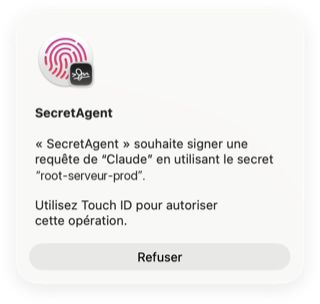
Here’s the concrete flow. You run ssh root@prod-server. The server demands a signature to prove you hold the key. The request reaches Secretive, which has to get the Secure Enclave to sign.
And there, the chip refuses to sign until it has verified your biometrics. A Touch ID window appears, you place your finger, the signature happens inside the chip, the connection is established. No finger, no signature, no connection.
Two settings make the whole thing solid.
The first is the “require Touch ID every time” option. Without it, one unlock counts for a while and the agent could chain signatures right after. With it, each connection demands its own presence. That’s the setting to enable, no debate.
The second is a technical point worth stating clearly. The Secure Enclave can natively handle only one type of key, an elliptic-curve key, ECDSA P-256 (Elliptic Curve Digital Signature Algorithm on the NIST P-256 curve). That’s your foundation, and it’s perfectly solid for SSH.
You may read here and there promises of post-quantum keys in Secretive. Beware the conflation: what’s post-quantum isn’t in the Secure Enclave, which does only P-256. The real bodyguard is the non-copyable hardware key and the finger that activates it, not a fashionable curve.
A word from experience. I use this setup daily, and it changes a reflex. Opening a root access no longer comes down to typing a password with your mind elsewhere, you have to place your finger. The most dangerous gesture of your day becomes a conscious one again.
For the background, what the Secure Enclave really is and what it protects in your Mac, it’s explained in detail here. Further reading: Apple Silicon, what the Secure Enclave really changes
What it changes, and what it costs you
Take the honest tally, gains on one side, bills on the other.
The main gain, we said it: the most sensitive SSH connection, the one that opens root on a server, now demands a physically present human. A malicious agent, or one gone rogue, hits a wall no line of code gets past. That’s concrete, not a layer of security policy that a --dangerously-skip blows away.
The side gain is that key theft becomes moot. There’s no private key file left to steal. An attacker can copy your entire ~/.ssh, gets nothing from it, the key isn’t there. It’s in a chip that will never give it up.
Now the bill, because there is one and it’s real.
The key is neither exportable, nor backup-able, nor transferable. That’s the exact flip side of its strength. Since it never leaves the chip, you can’t copy it to another Mac. New Mac, new key. In practice, you declare several authorized keys on your servers, one per machine, and you revoke a lost or resold Mac’s access by removing its public key on the server side.
You need an offline fallback plan. If your only Mac breaks down and the only key that opens your servers is in its chip, you’re out, locked out of your own fleet.
The discipline that comes with this setup is to keep a separate recovery key, generated the classic way, encrypted with a strong passphrase, stored offline, on a cold medium you only plug in in case of disaster. It’s not a comfort detail, it’s what separates a good practice from a trap you lock yourself into.
And keep an escape hatch outside the setup itself. The recovery key solves the lost-key problem, not the closed-network one. If you’ve cut public port 22 and your only tailnet machine has just died, your fallback key is useless, there’s no door left to present it at.
The real way out is your host’s console access, the KVM or the serial console in its panel, which gives you control of the server without going through SSH or the tailnet. Check that it works and that you know how to connect before you need it, not on the day of disaster.
These constraints aren’t hidden flaws. They’re the conditions of a system where the key is truly out of software’s reach. You can’t at once want a key no program can copy and a key you back up with one click.
The Secure Enclave guarantees your presence, not your intent
Here’s the section most articles on the subject (if they exist!) will happily skip. It’s the heart of this one’s honesty.
Touch ID proves one thing, and one only: a human was physically there and authorized the use of the key. It doesn’t prove that this human understood the remote action hidden behind it. The chip verifies your presence, it doesn’t read your mind.
This isn’t philosophy, it’s structural, and it comes down to a protocol detail. When a connection demands a signature, the SSH agent, so Secretive, does not receive the destination server’s name or the command that will run over there. It receives an opaque block of data to sign, roughly a session fingerprint and a username.
The result: Secretive can’t show you “you’re connecting to prod-server to run rm -rf,” because it doesn’t know itself (with a command like that, I hope your Kopia backup is up to date… otherwise you cry!). It can show you which local program is requesting the signature, not where to or what for.
It’s not a flaw in the app, it’s a limit of the SSH protocol.
You see the scenario that stays open. A hijacked agent doesn’t need to force the chip. It just has to place its signature request at the moment you’re expecting a legitimate one.
You kick off a deployment, you know you’ll have to validate two or three Touch IDs, you’re in “I’m signing my workflow” mode. The agent slips its connection into the batch. You place your finger out of habit. You’ve just signed something you didn’t see coming. Right there, you’ve been fooled big time and the gesture can’t be taken back.
This mechanism has a documented big brother, approval fatigue. In 2022, an Uber contractor, drowning under multi-factor notifications triggered by an attacker, ended up approving one just for some peace. The attacker was in.
Repeated Touch ID is exposed to the same reflex: validate often enough and you validate without looking.
So let’s be precise about what the fix really does. It doesn’t remove the risk, it transforms it.
-
Before. An agent gone rogue pivots on its own, in silence, remotely, at machine speed. Thousands of connections per second, no human in the loop. That’s the November 2025 campaign.
-
After. The agent can no longer do anything on its own. To get a signature, it has to trap a specific human, present, at a specific instant, and land its manipulation exactly then.
The gain is enormous and you have to measure it for what it is. We go from a scalable, silent, asynchronous attack to a synchronous, targeted one that requires a successful human deception at the right moment. We’ve killed mass automatic pivoting, and put a human back on the most dangerous gesture. But the residual grip exists, and it has a name, your own reflex.
The discipline that goes with it
Since the remaining link is human, the rules that fence in that link are human too. They’re not optional, they’re part of the fix as much as the chip is.
-
One key per server, never a master key. A signature must count for a single host only. Secretive handles multiple keys with ease, use that. That way, even a signature squeezed out of you opens only one door, not the whole corridor.
-
Touch ID on every use, no caching. The setting seen above. It stops the agent from chaining signatures on a single presence.
-
Zero burst validation. A deployment that asks you to validate five Touch IDs in a row is the perfect ground to slip in a sixth. If you can’t say what each finger you place corresponds to, stop.
-
Read the access notifications. Secretive tells you which program is requesting a signature. A tool you weren’t expecting asking to sign is the red flag. It doesn’t tell you which server, but it tells you who’s asking, and that’s worth the glance.
-
Require your agent to announce every connection. Secretive doesn’t know the destination, the agent does. Give it a standing instruction: state in plain text, in the conversation thread, which server it’s connecting to and why, before each signature request. The protocol won’t say it, the agent can. A Touch ID window without the sentence announcing it in the transcript is a finger you don’t put down.
-
Be wary of any finger request you didn’t trigger. The golden rule. You didn’t start a connection and a Touch ID window pops up? You refuse, you find out why. Doubt beats a phantom deployment.
None of these rules is technical, and that’s exactly why no tool can apply them for you. The chip guards the gesture, you guard the attention.
In short
An AI agent doesn’t attack you like an old-school hacker. It has nothing to force, it inherits your rights and your keys at startup, and it pivots from server to server without ever letting up. The ANSSI advises against it on workstations, the maker of one of these agents documented a real campaign. The diagnosis is solid, the fix was missing.
The fix rests on two independent locks. A Tailscale tailnet that closes your servers to the public internet and no longer exposes port 22, provided you keep classic SSH and its key, not Tailscale’s keyless mode. An SSH key in the Secure Enclave, via Secretive, non-copyable, activated by Touch ID on every connection. The network and the finger, two conditions a program alone never brings together.
Be clear-eyed about the limit, that’s what separates advice from a sales pitch. Touch ID proves your presence, not your intent. A clever agent can time its request for a moment when you’re expecting to sign.
Hence the discipline that must go with the setup: one key per server, Touch ID on every use, never burst validation, and wariness toward any unexpected request. And don’t forget your offline fallback key, and console access to the server, on pain of locking yourself out.
What you gain is clear. You go from an agent that pivots on its own, silent and massive, to an agent that has to trap a specific human, present, at a given instant. It doesn’t make you invulnerable. It puts your hand, physically, back on the most dangerous gesture in your infrastructure.
The theory is laid out. The step-by-step setup, installing Secretive, generating the key in the Secure Enclave, wiring the SSH agent, closing the port and writing your Tailscale rules, will be the subject of a tutorial soon.
This article gave you the why. The next will give you every command.
Sources
The agent’s own maker
- Anthropic, Disrupting the first reported AI-orchestrated cyber espionage campaign, the account of the GTG-1002 campaign of November 2025, by the company that makes Claude Code.
The public authority
- CERT-FR / ANSSI, CERTFR-2026-ACT-016, the official French advisory that warns against AI agents on workstations and details the risks.
The code and technical docs
- Secretive on GitHub, Max Goedjen’s open source app that stores your SSH keys in the Secure Enclave, code and README freely readable.
- Apple, the Secure Enclave (Platform Security guide), the vendor reference on how the chip works.
- Apple, CryptoKit SecureEnclave.P256, the proof that the Secure Enclave natively signs in ECDSA P-256.
- Tailscale, access control and default-deny (ACLs), the docs on the rules that, by default, allow no undeclared connection between your machines.
Independent analyses
- Graham Helton, Zero Effort Private Key Compromise, Abusing SSH-Agent For Lateral Movement, the demonstration of hijacking the SSH agent for lateral movement.
- MITRE ATT&CK, T1563.001 SSH Hijacking, the reference entry on SSH session hijacking.