Code signing, the shared anchor of Santa and Little Snitch
A Little Snitch alert on your backup is not necessarily a missing signature. What code signing really controls, with Santa in parallel.

Series · Spin-offMake Your SIEM Talk Contents
- 1 Your sovereign SIEM, learn to read it properly then make it act
- 2 Wazuh, write the rule that catches what you're really after
- 3 Santa in Wazuh, from noise to an alert that speaks
- 4–5 Coming up
Spin-off
- Code signing, the shared anchor of Santa and Little Snitchyou are here
The other night, my backup stopped dead in the middle. Kopia, my backup tool, was running like always, packing up my files, opening the connection to my S3 space at Infomaniak, a new path I had just set up, and then nothing. A Little Snitch window, front and center, politely asking whether I would let this process out.
My first reflex, and it was wrong, was to think, right, Kopia must have been updated with a different signature. Is that why Little Snitch has it in its sights?
The tidy little story, ready to go, the open source tool that has run on my machine for months, suddenly held back by the firewall for want of a valid signature. I believed it for a good minute. I was wrong, and that is exactly what makes it worth telling.
Because I checked. codesign and spctl on the machine, two commands, verdict with no appeal. Kopia is signed with a Developer ID and notarized by Apple, a stable Team ID to boot. The signature intact, the original publisher’s, no substitution. So if the signature was in order, why the alert?
The answer comes down to a distinction almost nobody makes, and it changes everything in how you react. A Little Snitch first-connection alert is not a verdict on the signature. It is the normal behavior of Alert mode for a process you have not yet covered with any rule, signed or not. The real role of the signature is elsewhere, deeper, and it is the same thread that ties Little Snitch to Santa, the other guard on your Mac. Follow the thread, and you will never look at a firewall popup the same way again.
Two guards, one criterion
On a seriously hardened Mac, a binary passes two independent checks before it does anything useful.
The first happens at execution. You double-click, the system calls execve, and a guard steps in, looks at who this binary is, and decides whether it gets to run. That guard is Santa. Its question is simple, is this binary allowed to execute?
The second happens at network egress. The process is already running, it cleared the first door, and it tries to open a connection to a server somewhere on the Internet. Another guard steps in, looks at which process is talking and to whom, and decides whether it gets to leave. That guard is Little Snitch. Its question, just as simple, is this process allowed to speak outside?
Two guards, two questions, two moments. Santa controls the entrance, what gets to run. Little Snitch controls the exit, what gets to communicate.
Picture a building. Santa is the bouncer at the door, deciding who comes in. Little Snitch is customs on the way out, deciding who leaves and with what. Two posts, two distinct gestures, but both checking the same passport.
And the link between them, the one nobody shows you, is that they anchor on the same thing. Not the binary’s name, not its path on disk, its signature. The cryptographic proof that it really comes from the publisher it claims, and that it has not been modified since. That shared anchor is what makes a binary governable, on both sides, by a rule that holds.
Santa, the bouncer at the door
Santa is an execution control system for macOS. Its principle is a reversal, it does not hunt for malicious binaries, it only allows known ones. An allowlist, not a blocklist. Whatever is not explicitly allowed does not run.
To recognize a binary, Santa has several identifiers, which it evaluates in order of precedence, from the most precise to the broadest. The CDHash, the fingerprint of the paged content. The binary hash, a SHA-256 of the whole file. Then the identifiers drawn from the signature, the Signing ID of a specific application, the Certificate, and the Team ID of an entire publisher. The first two break with every app update. The signature identifiers, on the other hand, are the right level for an allowlist that lasts, you trust a publisher’s signature, and all its signed applications pass, updates included.
That is where the signature pays off. A tool signed with a stable Team ID, like Kopia and its Developer ID certificate, you authorize once by that Team ID, and it stays authorized across its versions. A truly unsigned binary, by contrast, has neither a Signing ID nor a Team ID, no cryptographic identity to present to the bouncer. In Lockdown mode, the one that locks things down for real, a binary with no authorization or recognized signature is refused at execution, plain and simple. In Monitor mode, it passes, but Santa logs that, on lockdown day, that one will fall. A third mode, Standalone, lets the user decide case by case through a prompt, up to you whether you deploy it.
That is already a huge layer of sovereignty, and it deserves its own guide.
Further reading: Santa on your Macs, the uninvited binary stays at the door
Just hold on to this for what follows, in Santa’s eyes the signature is not a cosmetic detail, it is the stable identity key that makes a binary authorizable once and for all rather than at every version.
Little Snitch, customs on the way out
Change of guard. The binary cleared the door, it is running, and it wants out onto the network. This is Little Snitch’s turf, the outbound firewall that filters connections not by IP address, but by process and by destination.
Let us start by killing the misconception, mine five minutes ago. No, a Little Snitch alert does not mean “this binary is shady or unsigned.” Little Snitch has several operating modes, and the behavior depends first on the one you picked.
-
Alert mode, the default, asks for your call on every new connection no rule covers yet.
-
Silent mode, allow connections, lets through without asking anything not covered by a rule, and logs it.
-
Silent mode, deny connections, does the opposite, it blocks silently. There is no “observe mode,” that is a confusion, and it is exactly the one I had fallen into.
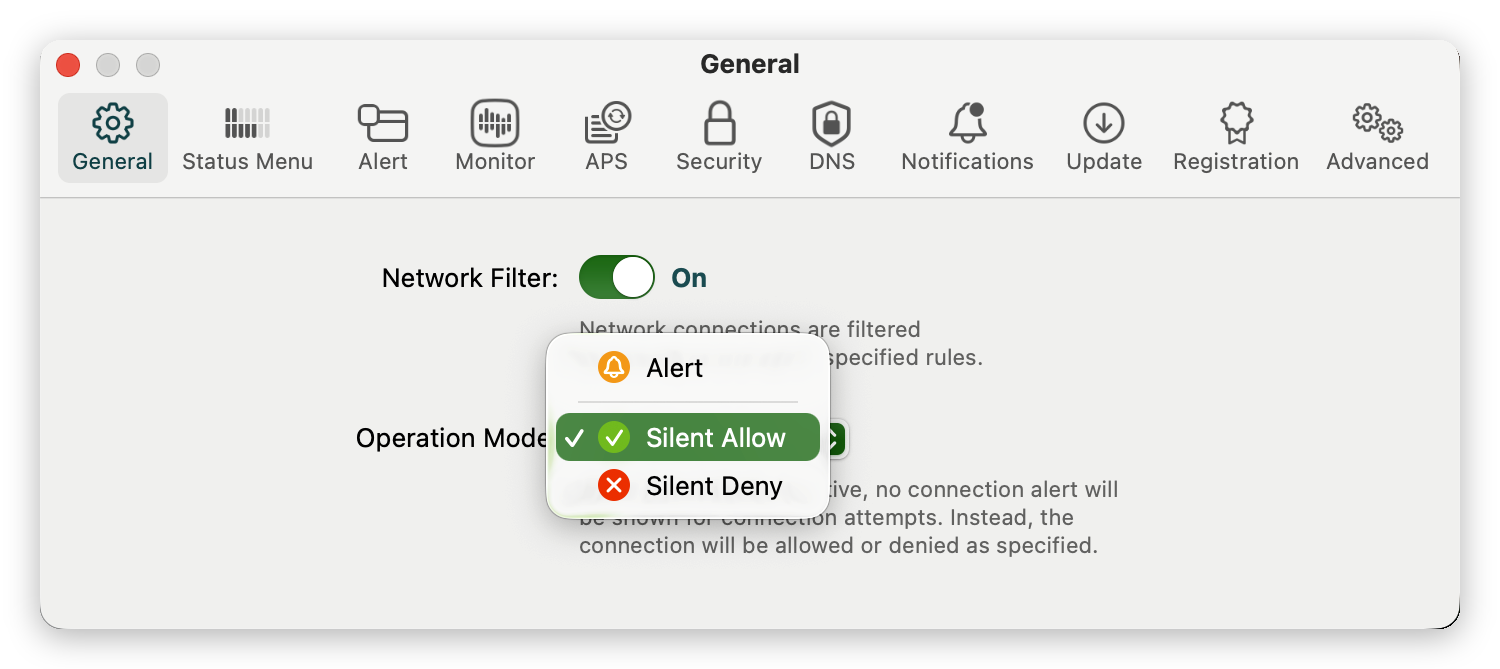
In Alert mode, the first connection of a process not yet covered triggers a popup, whether the binary is signed, notarized, or not. Kopia, my backup that is signed with a Developer ID after all, simply had no rule in its name yet to reach my host. First egress, first alert. Nothing abnormal, nothing accusing its signature. Had I been in silent allow mode, it would have gone through without a sound.
So what is the real role of the signature here? It is not to trigger or muffle the alert. It is to serve as an anchor for your rules. When you create an “allow this process” rule, Little Snitch can lock it to the publisher’s signature rather than to the file’s mere path. And that is where it gets clever, if a piece of malware one day swaps your legitimate binary for a fake at the same spot on disk, the signature no longer matches, the anchored rule stops applying, and Little Snitch re-alerts you instead of letting the impostor enjoy an authorization that was never meant for it.
That is the real link between the signature and the network. Not “no signature means an alert.” Rather “the signature guarantees an authorization only covers the authentic binary, and drops the moment it is swapped.” The attack this blocks has a precise name, binary substitution. A path on disk can be squatted. A valid signature cannot.
So my backup did not stop because Kopia was suspect. It stopped because I was in Alert mode and that new S3 path was a destination no rule covered yet, a never-seen process-plus-destination pair. Little Snitch was doing exactly its job, showing me a never-seen connection so I could decide how to frame it, once and for all.
If you are still on the fence about the outbound firewall tool itself, that match is elsewhere.
Further reading: Little Snitch vs LuLu, which outbound firewall for your Mac
The signature, the shared anchor of both layers
This is where the parallel earns its keep, not just a pretty symmetry.
Look at what the signature does on both sides, and you see it plays the same role. On Santa’s side, it lets you authorize a publisher by its Team ID, once, and cover all its signed versions without coming back. On Little Snitch’s side, it lets you anchor a network rule to that publisher, so it only applies to the authentic binary and drops at the slightest substitution. Same key, two locks. The signature is the shared anchor that makes a binary governable by rule, at the entrance as at the exit.
And that is precisely what a truly unsigned binary takes away from you. Not one more alert, no, one anchor fewer. At execution, Santa has no stable signature to authorize, you are left with exact fingerprints that break at every update, and in Lockdown it refuses flat out. On the network, Little Snitch can still create a rule by path, but it is weaker, a path can be squatted, it will not detect a substitution the way a signature-anchored rule would. The unsigned binary is not “blocked twice,” it is simply less governable at both posts.
Here is the point to take away. Choosing signed tools, or signing your own, is not just a formality to calm Gatekeeper at first launch. It is what gives your whole security setup, execution control and network control, a durable grip on that binary, rather than a fragile identity you have to reassess at every version.
Sovereignty over your binaries is not just deciding what runs. It is also deciding what leaves. And both hold better when there is a signature to hang your rules on.
The Kopia case, in practice
Let us go back to my backup, because it is the most telling case, the one where a popup led me to the wrong conclusion before I checked.
Kopia is an excellent backup tool, open source, that I use to push my encrypted files to object storage. And contrary to what I had assumed, it was indeed signed with a Developer ID and notarized, stable Team ID. On Santa’s side, that works out well, I can authorize it cleanly by that Team ID and cover its future versions.
On Little Snitch’s side, the alert I saw was only the first connection to my new endpoint in Alert mode, not a trial for illegitimacy.
So the real question was not “why does it distrust me?” but “how do I frame this connection so it is authorized just enough?”.
The lazy reflex is to click to allow any connection for this process and move on. Bad idea, even for a signed binary. You just handed it a blank check to reach any server on the Internet. The day it is compromised, or replaced by an impostor, you have opened the door wide yourself.
The clean fix comes down to one specific rule, tightly framed.
- Target the binary by its exact path, not a global rule. The rule holds for the executable at that precise location, nothing else.
- Allow the one useful destination. In the popup, when Little Snitch offers you the scope of the connection, choose the domain of your host rather than the broadest option, “Any Connection.” Kopia needs to reach your storage, it has no reason to talk to anything else.
- Nothing more. No generous wildcard, no permanent authorization over the whole network.
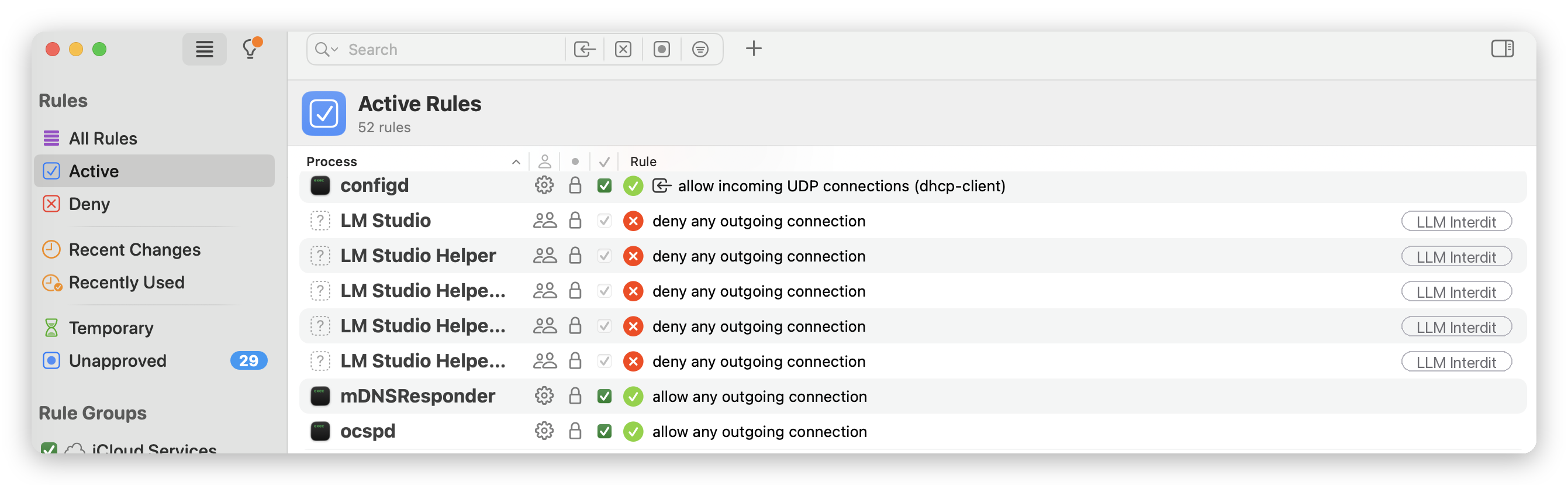
The result is the right trade-off. Your backup runs without interrupting you, and the process stays confined to the one corridor it needs. You did not bypass security, you tuned it. The difference between “I click yes for some peace” and “I authorize exactly what is needed” is the whole difference between suffering your tools and governing them.
What it changes, and what it does not
Hardening a Mac is not thought guard by guard, but as a chain. Santa and Little Snitch do not do the same job, they watch two distinct doors, but they read the same passport. Understanding that changes how you react to an alert, you stop panicking, you stop clicking “allow all” by reflex, you first ask whether it is simply a first connection to frame.
Misconception
An alert does not mean “suspect binary.” That is the trap I fell into with Kopia. In Alert mode, Little Snitch prompts you for every uncovered first connection, signed or not, notarized or not. The popup is not a verdict on the signature, it is a question of framing. And the other way around, unsigned does not mean malicious either, plenty of excellent free software is not signed by Apple because the Developer certificate is a paid service a volunteer project does not always take on. Two confusions to avoid, the same lesson, never mistake “I do not know this process yet” for “this process is shady.”
The real limits
Santa does not read everything. It controls the execution of binaries, not the content of a Python script or a shell launched by an already-authorized interpreter. That is its known limit, and it is real. The execution-plus-network duo reduces it without removing it, a script exfiltrating data will still have to open a connection, and there Little Snitch takes over.
Little Snitch does not share the spot. macOS allows only one network content-filter provider active at a time, the famous data-filter slot. It is Little Snitch or LuLu, not both together, they fight over the same extension. Careful not to confuse this with an encrypted DNS profile, which belongs to a different network extension category and does not consume that slot, so you can have it on top. It is an Apple constraint, not a flaw in the tool, but it shapes your architecture.
None of this cancels the principle. These two layers complement each other, each closes a blind spot of the other, and to go further on the settings that harden the machine day to day, the groundwork is elsewhere.
Further reading: Privacy on macOS, the settings to change right away
In short
A firewall alert is not a verdict on a binary’s signature. Most often, it is just a first connection to frame, in Alert mode, for a process no rule covers yet. I believed the opposite for my backup, I checked, and Kopia was signed and notarized from the start. The signature’s real function is not to trigger the alert, it is to serve as a shared anchor, for Santa to authorize a publisher once and for all, for Little Snitch so a rule only covers the authentic binary and drops the moment it is swapped.
In practice, three reflexes. Faced with an alert, never click “Any Connection” for convenience, ask yourself whether it is simply a first connection, then write a rule by path toward the one useful domain. When you choose software, the signature is not a luxury, it is what makes it governable by your whole setup, a stable Team ID on Santa’s side, a rule anchor on Little Snitch’s side. And when you think hardening, think of both ends, what runs and what leaves, tied together by the same passport, the binary’s signature.
Further reading: Your sovereign SIEM, learn to read it properly then make it act, where the decisions Santa logs become something you actually look at.
The logical next step, once Santa is set to Monitor mode, is to feed what it logs into your SIEM. That is the subject of the next episode, plugging Santa into Wazuh and correlating what runs with what gets blocked.
Sources
To dig in yourself, primary documentation rather than second-hand forums.
- Santa, modes and identifiers: official North Pole Security documentation
- Little Snitch, rule concepts: help.obdev.at, concepts-rules
- Little Snitch, code signature as a rule anchor: help.obdev.at, adv-code-signature
- Little Snitch, operating modes: help.obdev.at, intro-opmodes
- The single macOS network filter slot: Apple NEFilterManager documentation
- Kopia, installation: kopia.io/docs/installation
- Kopia, source repository: github.com/kopia/kopia